
Requirements
US Passport Photo Guidelines 2026: Every Rule Explained
Every US passport photo rule the State Department applies in 2026, in one place: size, head position, background, lighting, expression, glasses, clothing, the new guidance on edited and AI photos, and what changes for digital uploads, babies, and printed photos.
Updated November 29, 2026
Get your compliant passport photo now
Upload any photo from your phone. We format the background, crop, and sizing to US specs — digital 2×2 file plus 4×6 print sheet in under 60 seconds.
Upload Your Photo →The 2026 rules in one list
The US Department of State sets one photo standard for passport books, passport cards, and most US visa applications. The core rules have not changed in years, but the State Department now checks more closely for edited photos. Here is every rule you need to meet in 2026, in the order a passport specialist checks them.
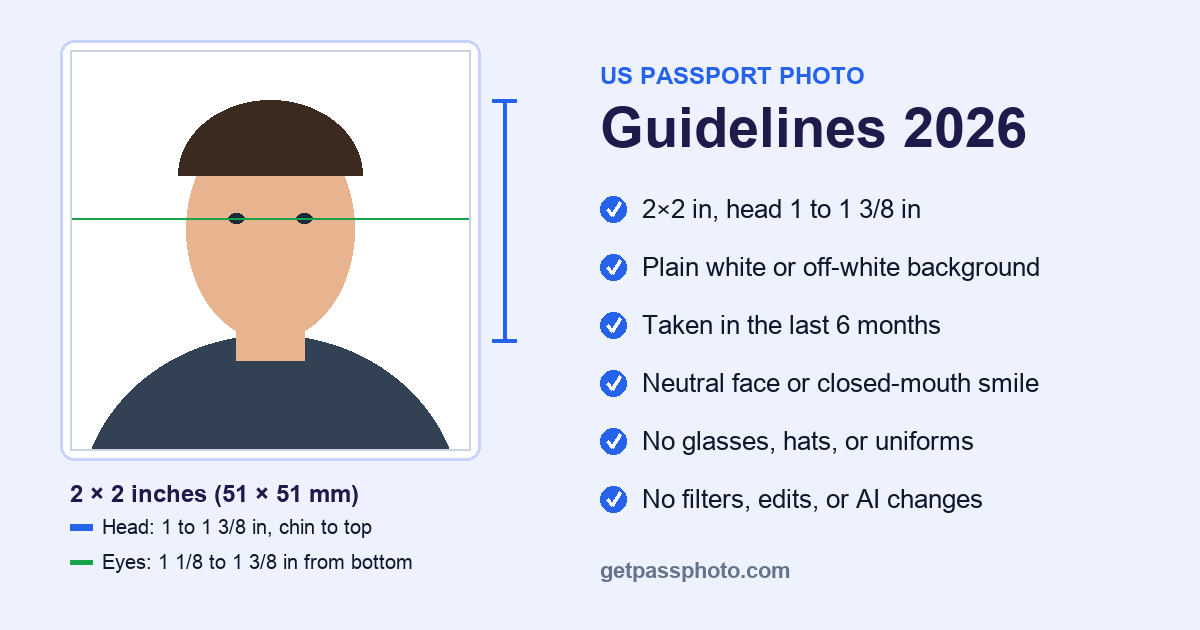
Size: 2×2 inches (51×51 mm). Head: 1 to 1 3/8 inches (25–35 mm) from the bottom of the chin to the top of the head, including hair. Eyes: 1 1/8 to 1 3/8 inches (28–35 mm) from the bottom of the photo. Background: plain white or off-white, with no shadows, texture, objects, or lines. Age of photo: taken in the last 6 months. Color: full color, not black and white. Expression: neutral, or a natural smile with the mouth closed, both eyes open. Glasses: not allowed. Edits: none. No filters, beauty modes, apps, or artificial intelligence.
If your photo fails any one of these, the State Department pauses your application and asks for a new photo. That adds weeks to your wait. The rest of this guide explains each rule, why photos fail it, and how to get it right the first time.
Photo size and head position
A printed US passport photo must be exactly 2×2 inches. Do not trim a larger photo by hand and do not shrink it to fit. Photo labs print 2×2 photos on a 4×6 sheet, which you cut along guide lines. This is the cheapest way to get a correct print.
Head size is the most common measurement error. Measure from the bottom of your chin to the top of your head, including your hair. The result must be between 1 inch and 1 3/8 inches. In a digital file that is 600 pixels tall, that is about 300 to 412 pixels, or 50% to 69% of the photo height. A photo taken too far away makes the head too small. A selfie at arm’s length often makes it too large and distorts the face.
Your eyes must sit between 1 1/8 and 1 3/8 inches from the bottom edge. Your face must be centered, and your head must face the camera directly. Do not tilt your head, turn it to the side, or lift your chin. Both ears do not need to show, but your full face, from hairline to chin, must be visible.
Background: plain white or off-white
The background must be plain white or off-white. It must have no pattern, no texture, no objects such as door frames or pictures, and no shadows. A light grey, cream, or pale blue wall is a common rejection reason, even when it looks white in person.
Shadows behind the head are the second most common background problem. They come from a single light source to one side of you, or from standing too close to the wall. Stand about 2 feet in front of the wall and face a window so the light falls evenly on you and the wall behind you.
If your wall is not plain white, online services such as GetPassPhoto can replace the background with plain white. The result must look natural: your hair outline intact, with no halo, blur, or cut-off strands, and your face untouched.
Lighting, focus, and color
Your face must be evenly lit, with no shadows across it and no bright spots. Overhead lights cast shadows under the eyes and nose. A ring light close to the face causes glare on skin and glasses. Daylight from a window in front of you is the simplest even light.
The photo must be sharp and in focus, in full color, with natural skin tones. Do not use a black-and-white photo or a photo with a color filter. The photo must not be grainy, pixelated, or blurry. A photo sent through a messaging app is often compressed too much. Use the original file from the camera.
Red-eye is a rejection reason. The State Department also says not to edit red-eye out of a photo. Avoid it by turning off the flash and using natural light.
Expression, eyes, and pose
Keep a neutral expression or a natural smile with your mouth closed. An open-mouth smile, a frown, raised eyebrows, or squinting can all lead to rejection. Both eyes must be open and looking straight into the camera.
Face the camera directly with your shoulders square. Your hair must not cover your eyes or eyebrows. Pull long hair back from your face or behind your shoulders if it covers part of your face.
Have someone else take the photo, holding the phone at your eye level about 4 feet away. Holding the phone yourself at arm’s length changes your face shape and usually tilts the head. If you are alone, use a tripod and the camera timer.
Glasses, head coverings, and clothing
Glasses are not allowed in US passport photos. This includes prescription glasses, reading glasses, and tinted lenses. It has been the rule since November 2016. The only exception is a medical reason, and you must include a signed statement from your doctor with your application.
Hats and head coverings are not allowed unless you wear them every day for religious or medical reasons. You need a signed statement confirming this. Your full face must still be visible, and the covering must not cast shadows on your face.
Wear normal everyday clothing. Uniforms, camouflage, and clothing that looks like a uniform are not allowed. Headphones, wireless earbuds, and similar devices must be removed. Avoid a white shirt against a white background: your shoulders disappear into the background. A darker or colored top works best. Jewelry is allowed if it does not hide your face.
Edited photos and AI: the 2026 guidance
The State Department’s January 2026 guidance advises against photos edited with “computer software, phone apps or filters, or artificial intelligence.” It also says it checks photos for signs of editing. This is the rule most likely to catch people out in 2026.
In practice, this means: do not use beauty mode, portrait mode, skin smoothing, filters, or apps that slim the face, whiten teeth, remove blemishes, or change your eyes. Do not use an app that generates a new image of you. The face in your photo must be your face, exactly as the camera captured it, including moles, scars, wrinkles, and skin texture.
Cropping to 2×2 inches is a normal step for every passport photo. GetPassPhoto does two things only: it crops to spec and auto-formats the background to plain white. It never smooths skin, brightens your face, or changes your features. Because any change carries some risk under the 2026 guidance, our guarantee backs every photo: if it is rejected, you get a full refund.
Digital photos for online renewal
If you renew online, you upload a digital photo instead of mailing a print. The online renewal system accepts JPEG, PNG, HEIC, and HEIF files between 54 KB and 10 MB. It then crops the photo itself, so your file needs your full head, the top of your shoulders, and plain space around your head.
All the same rules apply to a digital photo: white background, correct expression, no glasses, no edits. Do not upload a scan or a photo of a printed photo. Do not upload the 4×6 print sheet. Upload a single photo of yourself.
For the US visa form DS-160, the photo must be a square JPEG between 600×600 and 1200×1200 pixels, 240 KB or less. The DS-160 checks the file when you upload it and tells you if it fails.
Babies and children
Children need the same 2×2 photo, with one rule relaxed for babies: an infant’s eyes do not need to be fully open. No other person can appear in the photo, including a parent’s hands holding the baby.
The easiest setup for a baby is to lay them on their back on a plain white sheet and take the photo from directly above. Keep the light even and avoid shadows from the person holding the camera. Remove pacifiers, toys, and hats.
Children grow fast, so the 6-month rule matters most for them. A photo that is a few months old may no longer look like the child. Take a new one for each application.
Printed photos: paper and quality
Mail and in-person applications need one printed photo. Print it on matte or glossy photo paper. Do not print on regular paper. Home printers often produce colors and sharpness that are not good enough, and home-cut photos are often the wrong size.
The simplest option is a 4×6 print sheet with several 2×2 photos on it, printed as a standard 4×6 photo at CVS, Walgreens, Walmart, or any photo lab for well under a dollar. Cut one photo along the guides. Do not bend, staple through the face, or damage the photo.
Keep a spare. If the State Department asks for a new photo, or you need one for a visa or another document, you already have one.
How to get a compliant photo at home
Stand about 2 feet in front of a plain wall, facing a window in daylight. Turn off overhead lights. Take off your glasses and hat. Have someone stand about 4 feet away and take the photo at your eye level with the phone’s rear camera, with beauty mode and filters turned off. Take several shots and pick the one with your eyes open and your head straight.
Then check it. Use the free GetPassPhoto passport photo checker to test head size, background, and lighting before you spend money on prints. If the background is the only problem, GetPassPhoto replaces it with plain white and crops your photo to the exact 2×2 spec for $14.99. You get a digital file for online renewal, and with Photo + Print File, a 4×6 sheet to print at any pharmacy.
If your photo was already rejected, the free rejected photo fixer tells you whether it can be fixed or needs a retake, based on the reason in your letter. Before you apply, the free application checklist lists every form, document, and fee for your type of application.
Frequently asked questions
What are the US passport photo guidelines for 2026?
A 2×2 inch color photo taken in the last 6 months, with your head 1 to 1 3/8 inches tall, on a plain white or off-white background. Neutral expression or closed-mouth smile, eyes open, no glasses, no uniforms, and no editing, filters, or AI.
Did the passport photo rules change in 2026?
The size and composition rules are the same. The change is stricter attention to edited photos: the State Department’s January 2026 guidance advises against photos changed with software, apps, filters, or artificial intelligence.
Can I smile in my passport photo?
Yes, a natural smile with your mouth closed is fine. Avoid an open-mouth smile, squinting, or any expression that changes the shape of your face.
Can I wear glasses in a passport photo?
No. Glasses are not allowed unless you cannot remove them for medical reasons, and then you need a signed statement from your doctor.
Can I take my passport photo with my phone?
Yes. Have someone else take it at eye level about 4 feet away, in even daylight, in front of a plain wall. Turn off filters and beauty mode. Then crop it to 2×2 inches and make sure the background is plain white.
Is background replacement allowed?
The rules require a plain white or off-white background and an unaltered face. A replaced background must look natural, with a clean hair outline and no halo, and your face must not be changed. GetPassPhoto changes the background and crop only, and refunds you in full if the photo is rejected.
GetPassPhoto services
Related guides
- US Passport Photo Online: 2×2 Rules and How to Get Yours
Navigating the specific requirements for a US passport photo can be daunting, but GetPassPhoto simplifies the entire process. This comprehensive guide outlines all the critical specifications, from dimensions and background to facial expression and recency, ensuring you understand exactly what's needed for a successful application. Discover how our platform helps you prepare your passport photo online, adhering to strict government guidelines without the hassle.
- Passport Photo Checker USA: Test Your Photo Against US Rules
Navigate the complexities of US passport photo requirements with ease. This comprehensive guide details every crucial specification, from dimensions to background, and introduces GetPassPhoto's advanced checker to help ensure your photo meets official standards before submission. Avoid common pitfalls and prepare your application with confidence.
- Print a 2×2 Passport Photo: Size, Settings, and Where to Print
Navigate the complexities of passport photo requirements with GetPassPhoto, your ultimate solution for preparing and printing compliant 2x2 inch photos. Our service simplifies the process, ensuring your images meet critical specifications for US passports, from precise dimensions to the correct background. Discover how easy it is to upload, verify, and receive high-quality passport photos ready for your application.
Get your compliant passport photo now
Upload any photo from your phone. We format the background, crop, and sizing to US specs — digital 2×2 file plus 4×6 print sheet in under 60 seconds.
Upload Your Photo →