
Tools & Free Options
Free Passport Picture Maker: Limits, Risks, and When to Pay for Compliance
Compare free passport picture makers to verified formatting. What free tools do well, where they fail U.S. specs, and how to get a compliant 2×2 picture without rejection.
Updated May 30, 2026
Get your compliant passport photo now
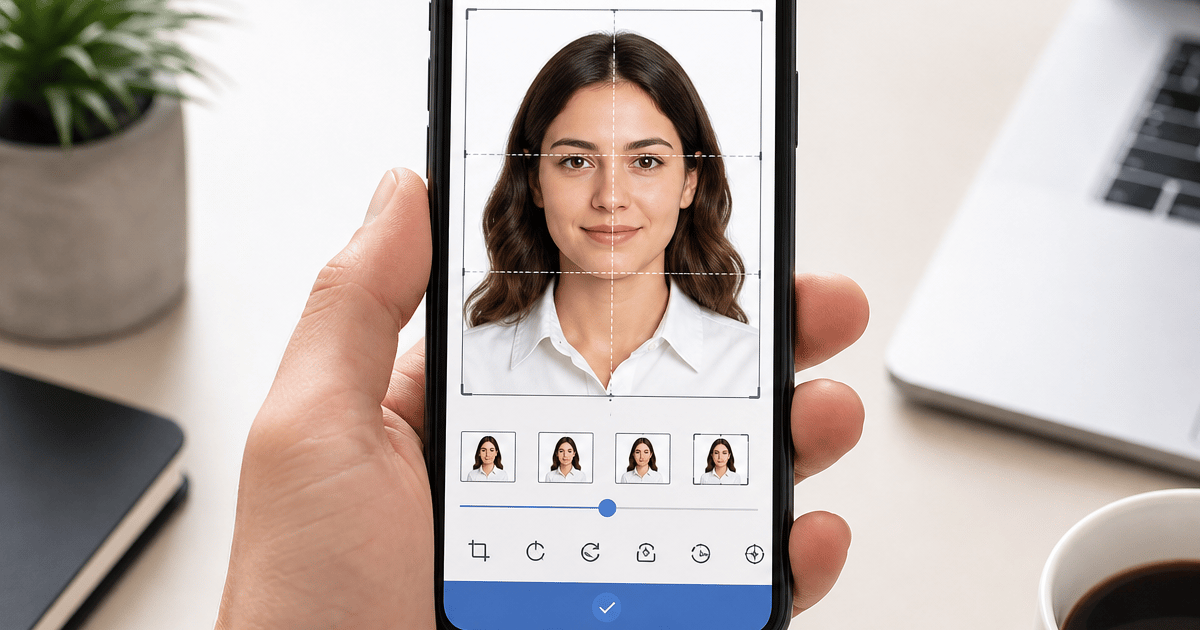
Upload any photo from your phone. We format the background, crop, and sizing to US specs — digital 2×2 file plus 4×6 print sheet in under 60 seconds.
Upload Your Photo →What people mean by a free passport picture maker
Searchers typing free passport picture maker usually want a web tool or phone app that turns an existing picture into a square 2×2 image with a white background — without paying upfront. The word picture often signals a casual source image: a selfie, a frame from a family album, or a phone snapshot taken against a bedroom wall. The goal is the same as passport photo: a compliant image for DS-11, DS-82, DS-160, or a state ID portal.
Most free passport picture makers offer background removal, square crop, and sometimes a white fill overlay. A few add print templates. Almost none measure head height as a percentage of frame, compress JPEG output to portal file-size limits, or guarantee acceptance if a government examiner rejects the file.
GetPassPhoto is a paid private formatting service — not a government website. Upload any recent picture at getpassphoto.com/upload and we replace the background, verify head size, export a 600×600 pixel JPEG under 240 KB, and deliver a 4×6 print sheet. Every order includes a 100% acceptance guarantee if the formatted picture is rejected after you submit it through our service.
Passport picture vs. passport photo — same compliance rules
Google treats passport picture and passport photo as overlapping intents. Whether you call it a picture or a photo, U.S. acceptance facilities and online portals apply identical technical rules: 2×2 inch print size, plain white or off-white background, head height between 1 inch and 1⅜ inches (50–69% of digital frame), color image, neutral expression, and recent capture within six months of application.
Free passport picture makers rarely explain that picture is not a lower standard. Parents searching for a free infant passport picture maker face the same head-size and background rules as adults. A cute snapshot with a patterned blanket fails even if a free tool crops it to square and paints white behind the subject.
If you already read our free passport photo maker guide, the compliance gaps are the same. This article focuses on picture-specific workflows — phone gallery uploads, print-at-home picture sheets, and the false confidence free makers create when they label an export compliant without running spec checks.
Where free passport picture makers fail silently
Head size is the top failure free tools skip. Auto-crop centers your face geometrically but does not measure chin-to-crown height. Pictures with heads too small or too large look fine in a phone preview and fail when an acceptance clerk overlays the official template or when DS-82 rejects the upload.
Pixel dimensions and file size cause the second wave of failures. DS-82 and DS-160 require JPEG format at minimum 600×600 pixels, typically under 240 KB. Free makers output 800×800, 1080×1080, or uncompressed 3 MB phone originals. Portals reject oversized files with generic errors that send users back to square one.
Background quality is the third category. Automated white replacement optimized for social media leaves gray halos around hair and shoulders. At print resolution those halos read as off-white or shadow — both rejection triggers. Free passport picture makers show a clean thumbnail; examiners zoom to 200%.
None of these issues appear in a free tool's green checkmark UI because the business model is ad traffic, not acceptance liability. You discover the gap only after submission, when processing delays cost more than a paid format would have.
When a free passport picture maker is useful
Use a free tool early in your workflow — not as the final submission step. Free makers help you preview whether background removal looks reasonable around curly hair, whether your source picture has enough resolution, and whether you need to retake against a plainer wall.
GetPassPhoto offers a free photo checker at getpassphoto.com/passport-photo-checker that scans for obvious lighting and face-detection issues without payment. That is a safer free step than exporting from an ad-supported maker and assuming the file is submission-ready.
If you export from a free passport picture maker anyway, manually verify all five specs before uploading anywhere: exactly 600×600 pixels, JPEG under 240 KB, head 50–69% of frame height, uniform white background at full zoom, and photo taken within six months. Most people miss at least one.
Print workflow: why free picture makers break at the printer
Many users want a free passport picture maker because they plan to print at home or at Walgreens. Free tools often output a single 2×2 image without a 300 DPI 4×6 sheet. Home printers scale to fit page unless you set 100% scale, producing pictures that measure 1⅞ or 2⅛ inches — automatic rejection at the counter.
A compliant print workflow needs six identical 2×2 pictures on one 4×6 sheet at 300 DPI. Pharmacy online upload flows expect a standard 4×6 file, not a loose square PNG. Free makers that skip the print sheet force users to guess layout in Canva or Word — another source of dimension errors.
GetPassPhoto delivers both outputs from one upload: a digital JPEG for online portals and a 4×6 print sheet with six 2×2 copies for DS-11 in-person submission. Upload the print sheet to Walgreens or CVS as a normal photo order, or print at home on glossy paper at actual size.
Free passport picture makers for babies and infants
Parents search free passport picture maker for newborns because pharmacy sessions are stressful and expensive. Free tools handle infant pictures the same broken way as adult selfies: square crop plus white fill without measuring infant head height or detecting visible caregiver hands at the frame edge.
Infant-specific rejections — hands in frame, patterned blankets, sleeping poses with obscured features — survive free background removal. The tool cannot remove a finger supporting the head without cropping into the face. Home flat-lay pictures on a white sheet work better as source material; formatting still requires head-size verification.
For newborn setup tips, see our passport picture for newborn guide. When you have a usable source frame, upload to getpassphoto.com/upload for infant-aware crop and background replacement with the same acceptance guarantee as adult orders.
What paid formatting adds that free picture makers cannot
GetPassPhoto runs automated validation on every upload before you pay. Background replacement to uniform white, head-height measurement with crop adjustment, 600×600 pixel export, JPEG compression under portal limits, and a preview of the exact file examiners will see — not a generic thumbnail.
The 100% acceptance guarantee aligns our revenue with your outcome. If the State Department, an acceptance facility, or a visa portal rejects a picture we formatted, forward the rejection notice for a full refund. No free passport picture maker offers that because they never learn whether your submission succeeded.
Pricing starts at $14.95 for a digital 2×2 file or $16.95 for digital plus print sheet, delivered by email within 60 seconds. That is comparable to one pharmacy session and far cheaper than a rejection delay of two to six weeks.
How to evaluate any free passport picture maker before you trust it
Run this checklist on every free export before submission. Open file properties and confirm JPEG at 600×600 pixels minimum and under 240 KB for digital portals. Print a test copy or overlay a ruler on screen — chin-to-crown must fall between 1 inch and 1⅜ inches on a 2×2 print. Zoom to 200% and inspect hairline and shoulders for gray halos or uneven white. Confirm the picture is color, forward-facing, unfiltered, and taken within six months.
If the free tool displays compliant or ready to submit without showing measurements, treat that label as marketing copy. Government portals do not read the tool's UI — they read pixels. A picture that passes three checks and fails head size still bounces your application.
The practical workflow: explore with free tools, scan with our free checker, then format at getpassphoto.com/upload when you are within thirty days of submission. Pay once, download verified digital and print files, and skip the rejection lottery free exports create.
The real cost of trusting a free passport picture maker
A rejected passport picture delays processing two to six weeks. For booked travel, that delay exceeds the price of verified formatting many times over. Retaking at CVS or Walgreens after a free-tool rejection costs another $15–$20 plus a second trip — the free maker was not free.
Free passport picture makers exist because search volume for free is enormous. Ad-supported tools monetize traffic without accepting liability for rejections. That model works for experimentation. It is a poor fit for a document that gates international travel and identity verification.
Upload your best source picture to getpassphoto.com/upload, preview the compliant result, and download a verified 600×600 JPEG plus 4×6 print sheet. The entire paid workflow takes under two minutes after you choose a source frame — faster than manually fixing a free export in a generic editor while guessing whether your head size is legal.
If you are comparing multiple free passport picture makers, run the same five-point checklist on each export side by side. The tool with the prettiest preview is rarely the one that passes head-size measurement. Verified formatting removes that guesswork in a single upload with a guarantee attached to the output, not to the marketing page.
Frequently asked questions
Is there a free passport picture maker that guarantees acceptance?
No. Free tools do not measure head size, compress to portal limits, or refund rejections. GetPassPhoto offers a 100% acceptance guarantee on paid orders starting at $14.95.
Does GetPassPhoto have a free passport picture maker?
We offer a free photo checker that scans for obvious issues. Full formatting with download and the acceptance guarantee requires a paid order at getpassphoto.com/upload.
Can I use a free picture maker and fix the file myself?
You can manually resize, compress, and measure head height, but most people miss at least one spec. GetPassPhoto automates all checks in one upload.
What is the difference between a passport picture and a passport photo?
The terms mean the same thing for U.S. applications. Both must meet identical 2×2 size, background, and head-height rules whether you search picture or photo.
GetPassPhoto services
Related guides
- Free Passport Photo Maker: What Works, What Fails, and When to Pay
Honest comparison of free passport photo makers vs. a compliant paid service. Free tools for cropping and background removal — and where they fall short.
- Online Passport Photo Maker Free: Limits, Risks, and Better Options
Searching for an online passport photo maker free? Compare what free makers deliver vs. a compliant paid format with acceptance guarantee.
- How to Make a Passport Photo Online (Compliant in 60 Seconds)
Make a passport photo online from any selfie. Auto-format to 2×2, white background, and correct head size for DS-11, DS-82, and DS-160.
Get your compliant passport photo now
Upload any photo from your phone. We format the background, crop, and sizing to US specs — digital 2×2 file plus 4×6 print sheet in under 60 seconds.
Upload Your Photo →