
Tools & Free Options
Make Passport Photo Online Free: What You Get, What You Don't, and When to Pay
Searching to make a passport photo online free? Honest guide to free tool limits, compliance gaps, and verified formatting with acceptance guarantee at GetPassPhoto.
Updated June 1, 2026
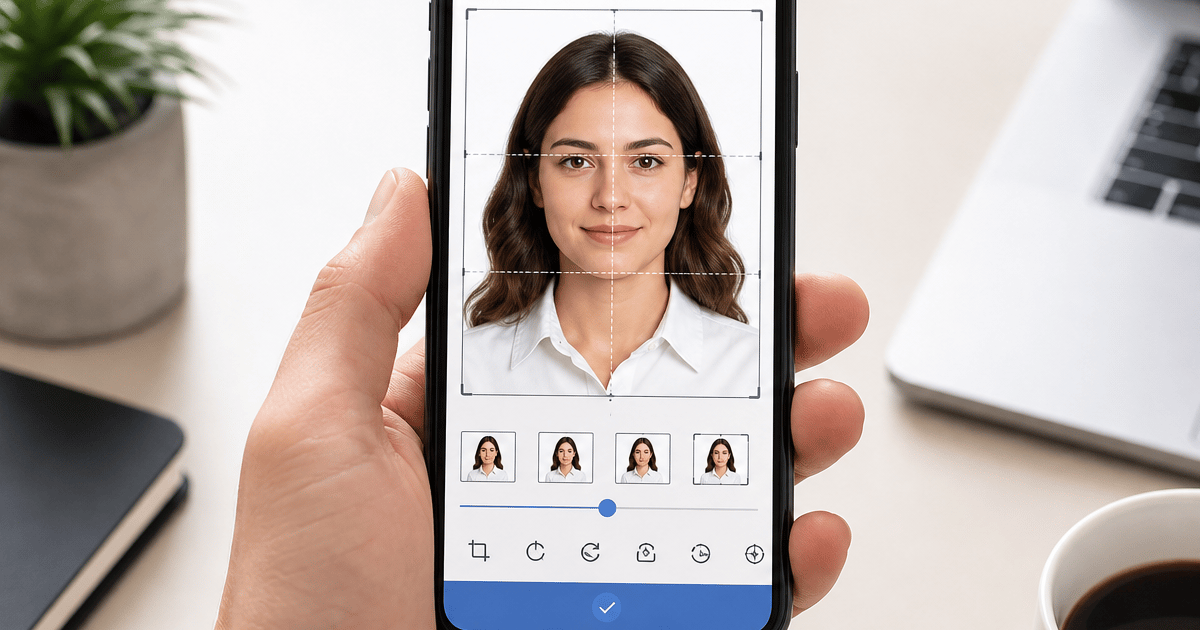
Get your compliant passport photo now
Upload any photo from your phone. We format the background, crop, and sizing to US specs — digital 2×2 file plus 4×6 print sheet in under 60 seconds.
Upload Your Photo →Why "make passport photo online free" is such a common search
Passport renewal and visa applications push people toward the fastest, cheapest path. Taking a selfie at home already feels free. Cropping it in a browser should be free too. Search engines reflect that expectation with thousands of results promising to make a passport photo online free in under a minute.
The gap is between making a photo that looks passport-like and making a file that U.S. government portals and acceptance facilities will accept. Free tools solve the visual problem — white background, square frame, face centered — far more often than they solve the compliance problem: exact pixels, head size ratio, JPEG compression, and background color without halos.
GetPassPhoto is upfront about what costs money: verified formatting at $14.99 for a digital file or $17.99 for digital plus a 4×6 print sheet, preview before pay, and a 100% acceptance guarantee. Nothing in this guide pretends free tools deliver a submission-ready file. They are useful for preview; they are risky for final upload.
What "free" actually means when you make a passport photo online
In practice, free almost always means free to use the interface, not free to download an unwatermarked, spec-compliant file. You upload a selfie, the site runs background removal and a square crop, then shows a preview. Removing the watermark, exporting at 600×600 pixels, or downloading a print layout typically requires payment — sometimes disclosed only after you have spent time adjusting the image.
Some tools export a low-resolution JPEG at no charge and charge for the version that meets portal minimums. Others never validate head size or file size; you discover problems when DS-82 or DS-160 rejects the upload or when processing stalls weeks later for a photo that passed automated checks but failed manual review.
Treat "make passport photo online free" as a preview step in a longer workflow, not as the last step before submission. For a broader comparison of free maker limitations, see our guides on free passport photo makers and online passport photo maker free options.
What free online tools typically include
Background removal or replacement with white or off-white fill — often with visible halos around hair and shoulders. Automated square cropping that centers your face without measuring chin-to-crown height as a percentage of the frame. Template overlays so you can eyeball head position against a generic passport outline.
Watermarked previews are standard. Unwatermarked downloads, correct 600×600 pixel output at 300 DPI, JPEG compression under 240 KB, and 4×6 print sheets with six spaced 2×2 photos are rarely included at no charge. Many exports land at arbitrary sizes — 512×512, 800×800, or 1080×1080 — that do not match U.S. digital requirements.
None of this makes free tools useless. They help you decide whether your source photo is worth formatting — whether lighting is even enough, whether background removal looks clean, whether you need to retake before spending money anywhere.
Where free tools fail U.S. passport and visa specs
Head size is the most common silent failure. U.S. rules require the head (chin to top of hair) to occupy 50–69% of image height. Free croppers center the face geometrically; they do not adjust zoom to bring your head into that band. Photos that look fine on a phone screen fail when a clerk overlays a physical template.
Pixel dimensions and file size are the second cluster of failures. Digital submission for passport renewal and visas expects color JPEGs at minimum 600×600 pixels, commonly under 240 KB. Free tools often output oversized files that trigger instant portal errors, or PNG files that portals reject outright.
Background color is the third. Examiner-ready white is not the same as "mostly white" after aggressive compression. Gray fringes, cream tones, and shadow remnants from the original wall read as non-compliant when zoomed. For the full 2026 rule set, see our passport photo requirements guide; free tools rarely encode every line of that spec into their export pipeline.
The hidden cost of submitting a free export
A rejected passport photo does not cost zero. Processing delays of two to six weeks are typical after a failed image. Travel plans, visa appointments, and employment start dates slip. Retaking at a pharmacy runs $15–$20 plus another trip — often more than a single verified online order.
The "free" export was free only if it passes on the first try. Most searchers who make a passport photo online free and submit without manual verification are playing a rejection lottery they cannot see until a notice arrives.
GetPassPhoto closes that gap with automated checks before you pay and a money-back guarantee if an acceptance facility or portal rejects a formatted file. Forward the rejection notice; receive a full refund. Free tools have no equivalent because they never learn whether your submission succeeded.
Free tools worth using before you pay for verified formatting
Use GetPassPhoto's free photo checker at /passport-photo-checker to scan for obvious issues — face not detected, multiple faces, extreme lighting — without payment. It is not a full maker; it tells you whether your source photo is a reasonable candidate before you commit to formatting.
Use a free background remover or free maker preview to judge hair edges and framing. If removal leaves heavy fringing or missing strands, retake the source photo with a plain light wall and even light before paying for any service.
Do not treat a free maker's download as your submission file unless you personally verify every spec: 600×600 pixels, JPEG under 240 KB, head 50–69% of frame height, plain white background, neutral expression, no filters. Most people miss at least one. That is why verified formatting exists.
How websites that let you make passport photos online free make money
High-intent keywords attract ad revenue, affiliate links, and freemium upsells. The business model rewards time on site and repeat visits, not guaranteed acceptance. More steps mean more ad impressions. Few free sites invest in face-detection logic that measures chin-to-crown height because it is engineering cost with no return unless you charge for the download.
Watermarking is the primary conversion lever: you see a plausible passport preview, then pay to remove the watermark or unlock "HD" resolution. Some sites quote zero dollars until the export step, then present a price comparable to a paid specialist — without a rejection guarantee.
GetPassPhoto charges $14.99 upfront for a verified digital file ($17.99 with a 4×6 print sheet), shows the unwatermarked formatted result before payment, and aligns revenue with successful delivery rather than with keeping you in a free editor loop. Paid path: https://getpassphoto.com/upload — upload once, preview, pay once, download compliant files in about 60 seconds.
Portal and print requirements free exports usually miss
DS-82 online passport renewal expects a digital JPEG that meets dimension, file size, and composition rules. Automated upload checks catch some problems immediately; others surface during manual review later. Free exports that pass a basic dimension check can still fail on head proportion or background tone.
DS-160 and other federal portals add similar constraints with different upload UX. State DMV and ID systems vary further. A single free export sized for one template rarely covers every path without manual rework.
In-person DS-11 submission needs a physical 2×2 on photo paper, not only a screen crop. Most free online flows do not deliver a print-ready 4×6 sheet with six correctly spaced photos. GetPassPhoto includes digital plus print sheet in the bundle tier so one formatted source covers online upload and pharmacy printing without re-running a free tool that may output different dimensions each time.
A practical workflow: make passport photo online free, then verify paid
Step one: capture a high-resolution source selfie — face the camera, neutral expression, plain light background, even lighting, no filters. Step two: run the free photo checker and optionally a free background preview. If detection fails or edges look messy, retake; do not pay yet.
Step three: when preview looks promising, upload the original source (not the free tool's export) to https://getpassphoto.com/upload for verified formatting. Starting from the highest-resolution original preserves detail through background replacement and crop. Step four: review the unwatermarked preview, choose digital-only or bundle with print sheet, pay once, download files delivered by email.
This workflow uses free tools for exploration and paid tools for submission — the same distinction as using a calculator versus filing a verified return. For related walkthroughs, see create passport photo online free and online passport photo maker free articles in this cluster.
GetPassPhoto vs. free online makers: side by side
Free online maker: background removal (unverified), square crop (unverified), no guaranteed head-size validation, no reliable file-size optimization, watermark on preview, no print sheet, no acceptance guarantee, liability stays with you.
GetPassPhoto: auto-format to compliant white background, 600×600 pixel export, head size validated between 50% and 69%, JPEG compressed for portal limits, optional 4×6 print sheet, preview before pay, 100% acceptance guarantee, delivery in about 60 seconds after purchase, no account required.
Pricing is $14.99 for a single digital file or $17.99 for digital plus print sheet — comparable to one pharmacy session but with unlimited retakes before checkout and a refund path free makers cannot offer. If you already used a free maker, still upload your original photo; do not chain unverified exports.
When to stop making passport photos online free and order verified output
If you plan to submit to a government portal or visit an acceptance facility within the next thirty days, a free export is the wrong final step regardless of how polished the preview looks. The decision is timing and liability, not aesthetics.
Stop using free makers as final exporters when you need DS-82 renewal upload, DS-160 visa photo, printed DS-11 photos, or any ID portal with strict JPEG rules. Continue using them earlier — to test background removal, compare framing, or decide whether to retake.
Upload to https://getpassphoto.com/upload when you are ready for a submission-grade file. Preview the compliant 2×2, pay once, and keep the email with digital and print attachments as backup if a portal upload fails. Consistency across applications beats running a new free export for each form and hoping head size matches every time.
Honest summary: free helps you try; paid helps you submit
You can make a passport photo online free for preview purposes. You cannot rely on that export alone for U.S. compliance without manual measurement and compression work most applicants skip. Free tools are ad-supported, watermark-driven, and structurally unable to refund you when a photo fails.
GetPassPhoto charges for verified output — $14.99 digital, $17.99 with print sheet — with preview before payment and a guarantee if the formatted file is rejected. Use /passport-photo-checker and free previews to reduce wasted orders; use /upload for the file you actually submit.
Bookmark https://getpassphoto.com/upload before a deadline instead of repeating the same free-tool search under time pressure. One verified order produces reusable files for multiple portals; free exports vary crop and compression every time. That consistency is what "make passport photo online free" searches promise but rarely deliver.
Frequently asked questions
Can I make a passport photo online completely free?
You can use free tools to preview background removal and cropping, but no free site reliably delivers an unwatermarked 600×600 JPEG under 240 KB with verified head size and a rejection guarantee. Manual verification is always required if you submit a free export.
Is GetPassPhoto free to use?
The photo checker is free and scans for obvious issues. Full formatting with download, print sheet option, and the 100% acceptance guarantee requires a paid order starting at $14.99 at getpassphoto.com/upload. You preview the formatted photo before paying.
Why do free sites watermark the download?
Watermarking is how free makers monetize traffic — you pay to unlock the final file. GetPassPhoto shows an unwatermarked compliant preview before checkout so you know exactly what you are buying.
Should I upload the free tool's export to GetPassPhoto?
Upload your original source photo, not a free tool's cropped export. Starting from the highest-resolution original preserves detail and lets GetPassPhoto measure head size from scratch rather than inheriting an unverified crop.
What if my free passport photo is rejected?
Free tools offer no refund path. If you used GetPassPhoto for the submission file and receive a rejection from the State Department or an acceptance facility, forward the notice for a full refund under our acceptance guarantee.
GetPassPhoto services
Related guides
- Create Passport Photo Online Free: What You Get, What You Miss, and When to Pay
Searching to create a passport photo online free? Compare free creation tools vs. verified paid formatting with acceptance guarantee for DS-11, DS-82, and DS-160.
- Online Passport Photo Maker Free: Limits, Risks, and Better Options
Searching for an online passport photo maker free? Compare what free makers deliver vs. a compliant paid format with acceptance guarantee.
- Free Passport Photo Maker: What Works, What Fails, and When to Pay
Honest comparison of free passport photo makers vs. a compliant paid service. Free tools for cropping and background removal — and where they fall short.
Get your compliant passport photo now
Upload any photo from your phone. We format the background, crop, and sizing to US specs — digital 2×2 file plus 4×6 print sheet in under 60 seconds.
Upload Your Photo →