
How-To
How to Make a Passport Picture Online (Compliant 2×2 in 60 Seconds)
Make a passport picture online from any phone snapshot. Auto-format to 2×2, white background, and correct head size for DS-11, DS-82, and DS-160.
Updated May 31, 2026
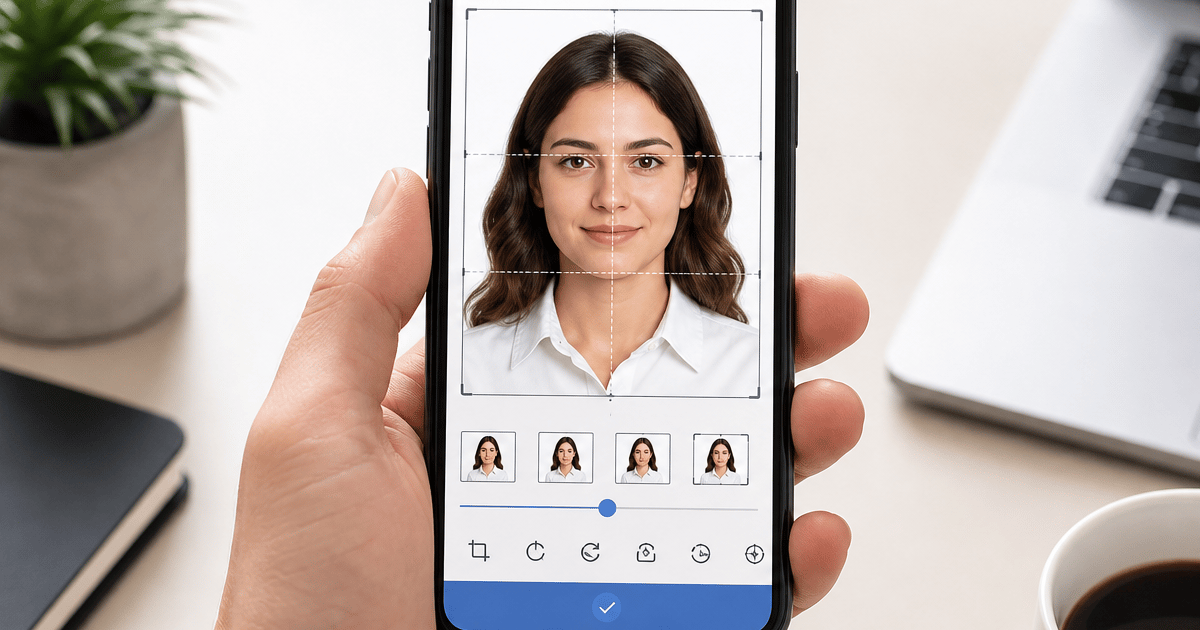
Get your compliant passport photo now
Upload any photo from your phone. We format the background, crop, and sizing to US specs — digital 2×2 file plus 4×6 print sheet in under 60 seconds.
Upload Your Photo →What "make a passport picture online" actually requires
A compliant U.S. passport picture is not a square crop of your face with a filter applied. The State Department specifies exact dimensions (2×2 inches), background color (plain white or off-white), head size (50–69% of frame height), and digital file rules (JPEG, 600×600 pixels minimum, typically under 240 KB for online portals).
People search make passport picture online because phone editors do not measure head height, compress to portal limits, or replace backgrounds without leaving gray halos around hair. Picture often means a casual source image — a selfie, a snapshot from your camera roll, or a frame someone took at home — that still must meet the same rules as a studio passport photo.
GetPassPhoto is a paid private online passport picture service — not a government site. Upload a picture at getpassphoto.com/upload, we auto-format to spec, and you download a digital file plus a 4×6 print sheet. The process takes under 60 seconds, with a 100% acceptance guarantee if your formatted picture is rejected after submission.
Passport picture vs. passport photo — same compliance rules
Google treats passport picture and passport photo as overlapping search intents. Whether you call it a picture or a photo, acceptance facilities and DS-82, DS-160, and state ID portals apply identical technical rules: 2×2 inch print size, plain white background, head height between 1 inch and 1⅜ inches on paper, color image, neutral expression, and capture within six months of application.
Free tools that label an export compliant without measuring chin-to-crown height create false confidence for picture uploads. A cute snapshot cropped to square can look correct on your phone and fail when an examiner overlays the official template or when a portal rejects file size.
If you already read our guide on how to make a passport photo online, the formatting steps are the same. This article focuses on picture-specific language — gallery uploads, phone snapshots, and the workflow searchers use when they want to make a passport picture online without visiting a pharmacy counter.
Step 1: Take a usable source picture
Stand or sit in front of a plain light-colored wall. Face the camera directly with shoulders squared. Remove glasses unless you wear them daily for medical reasons. Keep your expression neutral and mouth closed — the same rules apply whether you are making a picture or a formal studio photo.
Hold the phone at eye level, not below your chin and not above your forehead. Arm's length distance works for most adults. Use the rear camera when possible; it captures higher resolution than the front-facing lens, which matters before background replacement and crop.
Avoid direct sunlight behind you, which silhouettes your face, and avoid overhead-only lighting, which creates under-eye shadows. Window light from the side is ideal. Take a fresh picture within six months of your application — older pictures fail recency checks even after perfect formatting.
Step 2: Upload your picture and let the service auto-format
At GetPassPhoto, upload your picture at getpassphoto.com/upload. We detect your face, replace the background with compliant white, crop to 2×2 inches at 600×600 pixels, and verify head size falls within the 50–69% range before you pay.
You preview the formatted result before checkout. If something looks wrong — head too small, hair cut off at the crown, gray halos at the shoulders — retake the source picture rather than forcing a bad upload through. Unlimited previews cost nothing until you download the final files.
For a step-by-step on converting an existing image, see our guide on how to create a passport picture online. For turning any camera roll file into spec, see how to turn a photo into a passport photo — the upload mechanics are identical once you reach getpassphoto.com/upload.
Step 3: Download your passport picture and submit
After payment ($14.99 for a digital file, $16.95 with a 4×6 print sheet), both files arrive by email within 60 seconds. The digital JPEG is ready for DS-82 online renewal, DS-160 visa applications, and state ID portals that accept square uploads.
The 4×6 print sheet contains six identical 2×2 pictures. Print it at Walgreens, CVS, Walmart, or on a home photo printer at 100% scale with no fit-to-page scaling. Cut along the guides for DS-11 in-person submissions that require a physical print.
GetPassPhoto includes a 100% acceptance guarantee. If your passport picture is rejected by the State Department, an acceptance facility, or a visa portal, forward the rejection notice for a full refund. We are a paid private service, not affiliated with the U.S. government.
Making a passport picture online vs. pharmacy photos
Pharmacy counters charge roughly $15–$20 and require an in-person visit. Making a passport picture online lets you shoot at home, retry unlimited times before paying, and receive both digital and print files in one order — often for less than a second pharmacy trip after a rejection.
Free online picture makers can crop and remove backgrounds, but most do not verify head size or output the exact pixel dimensions and file size government portals require. Rejection risk is higher when you submit an unverified free export labeled compliant in the UI.
Paid formatting aligns cost with a verified deliverable. GetPassPhoto charges $14.99 for digital-only or $16.95 for digital plus print sheet, with instant email delivery and a guarantee free tools do not offer. Compare pixel requirements on our passport photo size in pixels page before you choose a submission path.
Which U.S. passport forms accept pictures you make online
DS-82 online renewal accepts a digital JPEG uploaded directly to the State Department portal. The file must be at least 600×600 pixels, JPEG format, and typically under 240 KB. When you make a passport picture online through GetPassPhoto, the digital output is sized for that portal without manual resizing.
DS-11 first-time applications submitted in person require a printed 2×2 inch picture attached to the paper form. The same online order produces a 4×6 print sheet with six identical copies. Order a standard 4×6 photo print at a pharmacy or print at home on photo paper at full scale.
DS-160 nonimmigrant visa applications and many REAL ID portals use similar digital specs — square JPEG, minimum 600×600 pixels, white background. One GetPassPhoto order from a single source picture covers these use cases. Store the digital file after delivery for renewals within the six-month recency window.
What to look for when you make a passport picture online
Head size verification is the feature most free picture tools skip. A service that only crops to square without measuring chin-to-crown height as a percentage of frame produces pictures that look correct on a phone but fail automated checks. GetPassPhoto validates the 50–69% head height rule before you download.
Background quality matters as much as dimensions. Automated white fill that leaves gray halos around hair is a top rejection reason. Choose a service that shows a full-resolution preview before payment. GetPassPhoto displays an unwatermarked preview so you can inspect edges around hair and shoulders before committing.
An acceptance guarantee separates paid services from free picture makers. GetPassPhoto offers a 100% acceptance guarantee — forward any rejection notice for a full refund. We are a paid private service, not affiliated with the U.S. Department of State. Pricing starts at $14.99 for a digital file or $16.95 with a print sheet, delivered by email within 60 seconds of purchase at getpassphoto.com/upload.
Common mistakes when you make a passport picture online
Using a picture older than six months is the most overlooked rejection reason. Background replacement and cropping cannot fix recency. Take a fresh snapshot before uploading, even if an older picture looks similar — examiners compare against your current appearance.
Submitting a free tool export without verifying file size causes DS-82 and DS-160 upload failures. Many portals reject files over 240 KB. Phone camera originals often exceed 3 MB. GetPassPhoto compresses to under 240 KB while maintaining the 600×600 pixel minimum — a step free picture apps usually leave to you.
Printing the 4×6 sheet at the wrong scale produces 2×2 pictures that measure slightly over or under true size on paper. Set your printer to 100% scaling with no fit-to-page option. If home printing mis-scales, upload the same print sheet to a pharmacy online order for one-hour pickup. The file is pre-sized at 300 DPI; printing is the last variable you control.
How GetPassPhoto formats your picture when you make a passport picture online
The upload flow starts with face detection on your source picture. Our system locates the chin, crown, and shoulder line to calculate head height as a percentage of the frame. If the head falls outside the 50–69% range, the crop adjusts automatically before background processing begins. You see the corrected preview before payment — not a thumbnail that hides edge quality around hair and ears.
Background replacement runs after crop confirmation. The original background — wall color, room clutter, outdoor scenery — is replaced with uniform white that meets State Department off-white specifications. We do not alter facial features, smooth skin, or adjust expression. Background replacement and crop-to-spec are standard across the passport picture industry; we do not use AI to change how your face looks.
Export produces two files: a 600×600 pixel JPEG under 240 KB for digital portals, and a 4×6 inch print sheet with six 2×2 pictures at 300 DPI. Both arrive by email within 60 seconds of purchase. No account creation is required. GetPassPhoto is a paid private service with a 100% acceptance guarantee. We are not affiliated with the U.S. Department of State.
Digital passport picture specs (pixels and file size)
Online portals measure pictures in pixels, not inches. The minimum is 600×600 pixels in JPEG format. Aspect ratio must be square — 1:1 — so a rectangular phone snapshot must be cropped before submission, not squeezed horizontally or vertically.
File size caps matter as much as dimensions. DS-82 and DS-160 commonly reject uploads over 240 KB even when pixel count is correct. Re-saving a picture through messaging apps or screenshots often adds compression artifacts and unpredictable file size. Upload the original attachment from your GetPassPhoto order email.
Our digital passport photo page walks through portal-specific use cases. When you make a passport picture online here, the exported JPEG is built for those limits so you do not need a separate compressor or resize tool before DS-82 or DS-160 upload.
After you make a passport picture online: submission and storage
For DS-82 online renewal, log into the State Department portal and upload the digital JPEG from your GetPassPhoto confirmation email. Do not screenshot the preview or re-save through a messaging app — both reduce quality and can push file size above portal limits. Upload the original attachment directly from email or cloud backup.
For DS-11 in-person submission, print the 4×6 sheet before your acceptance facility appointment. Attach one 2×2 picture to the application form as directed. Keep the remaining copies for visa applications, Global Entry, or state ID renewals that require the same picture within the six-month recency window.
Store both files in a folder labeled with the date you took the source picture. When recency expires for a future application, retake and upload again at getpassphoto.com/upload — the flow takes under 60 seconds from picture selection to email delivery. Each family member needs a separate order; every order includes the same 100% acceptance guarantee and instant delivery from our private paid service.
Compare the formatted preview to published State Department specs before submitting anywhere. Head height, background whiteness, and square crop are visible at full zoom in the preview screen. If any element looks off, retake your source picture and re-upload at no extra preview cost — you pay only when you download the final compliant files from GetPassPhoto.
Frequently asked questions
Can I make a passport picture online with my phone?
Yes. Take a snapshot or have someone photograph you, then upload it to GetPassPhoto from your mobile browser at getpassphoto.com/upload. The entire flow works on mobile without installing an app.
Does an online passport picture work for DS-82 renewal?
Yes. DS-82 online renewal accepts a digital JPEG meeting the 600×600 pixel minimum and typical file-size limits. GetPassPhoto outputs a file sized specifically for that portal.
How much does it cost to make a passport picture online?
GetPassPhoto charges $14.99 for a digital 2×2 file or $16.95 for the digital file plus a 4×6 print sheet. Both options include a 100% acceptance guarantee and email delivery within 60 seconds.
Is a passport picture the same as a passport photo?
For U.S. applications, yes — the same size, background, head-height, and recency rules apply. GetPassPhoto formats either term to the same compliant output from your uploaded source image.
Is GetPassPhoto a government website?
No. GetPassPhoto is a private paid service. We are not affiliated with the U.S. Department of State. We format passport pictures to their published specifications with a money-back guarantee on rejection.
GetPassPhoto services
Related guides
- How to Create a Passport Picture Online (Compliant 2×2 in 60 Seconds)
Create a passport picture online from any phone snapshot. Step-by-step guide to background, crop, head size, and download for DS-11, DS-82, and DS-160.
- How to Make a Passport Photo Online (Compliant in 60 Seconds)
Make a passport photo online from any selfie. Auto-format to 2×2, white background, and correct head size for DS-11, DS-82, and DS-160.
- Turn a Photo Into a Passport Photo: Background, Crop, and Size
Turn any existing photo into a compliant passport photo. Background replacement, 2×2 crop, head sizing, and file export for DS-11 and DS-82.
Get your compliant passport photo now
Upload any photo from your phone. We format the background, crop, and sizing to US specs — digital 2×2 file plus 4×6 print sheet in under 60 seconds.
Upload Your Photo →