
How-To
Turn a Photo Into a Passport Photo: Background, Crop, and Size
Turn any existing photo into a compliant passport photo. Background replacement, 2×2 crop, head sizing, and file export for DS-11 and DS-82.
Updated May 28, 2026
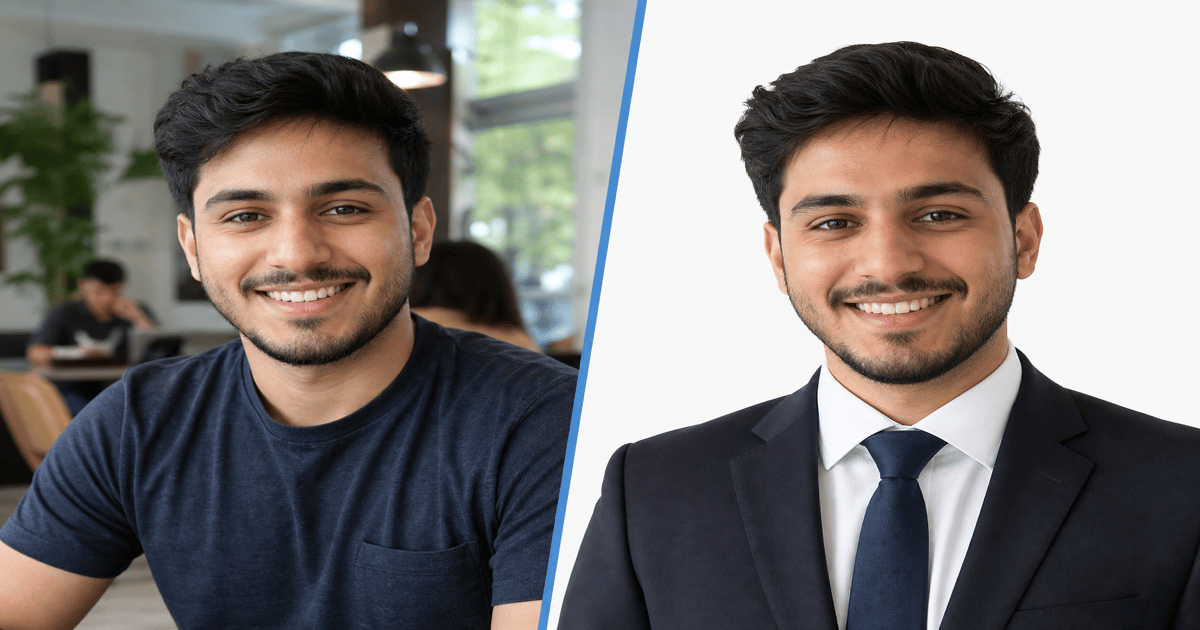
Get your compliant passport photo now
Upload any photo from your phone. We format the background, crop, and sizing to US specs — digital 2×2 file plus 4×6 print sheet in under 60 seconds.
Upload Your Photo →Can you turn an existing photo into a passport photo?
Yes — if the source photo meets minimum quality requirements. You need a recent color photo showing your full face, taken within the last six months, with no filters or heavy editing.
The conversion process involves three steps: replace the background with plain white, crop to 2×2 inches with correct head size (50–69% of frame height), and export as a 600×600 pixel JPEG under 240 KB.
GetPassPhoto automates all three steps from a single upload. You do not need a photo taken against a white wall — any background works as a starting point.
Which source photos work best
Ideal source: a phone photo taken against a light wall, face forward, neutral expression, no glasses glare, no shadows on the face. Shoulders visible, head not tilted.
Usable with effort: photos with busy backgrounds, slight angles, or indoor lighting. Background replacement and recropping can fix these if the face is clearly visible.
Will not work: group photos (crop cannot isolate one face at correct head size), photos with hats or sunglasses, black-and-white images, or heavily filtered social media photos.
Background replacement: the critical step
The State Department requires a plain white or off-white background with no shadows, patterns, or visible objects. Simply placing a white rectangle behind your face in an editor is not enough — examiners check for halos, color fringing, and uneven tone.
Professional background replacement isolates the subject at pixel level and fills with uniform white. This is the core of what GetPassPhoto does.
For manual background editing tips, see our guide on making the background white for a passport photo.
Cropping and head size after background replacement
After background replacement, crop to a square with the head centered. The chin-to-crown distance must fill 50–69% of the image height. Eyes should fall roughly in the middle third of the frame horizontally.
Leave a small margin above the head and below the chin. Do not crop into the hair or forehead. Do not leave so much space that the head appears tiny.
Export at 600×600 pixels. See our guide on making a photo 2×2 for the exact pixel and print dimensions.
Turning your photo into a passport photo with GetPassPhoto
Upload your source photo at getpassphoto.com/upload. Preview the formatted result. Pay $14.95 for the digital file or $16.95 for digital plus print sheet.
Download both files from email within 60 seconds. Use the digital file for DS-82 online renewal and DS-160. Print the 4×6 sheet for DS-11 in-person submission.
If the converted photo is rejected, forward the rejection notice for a full refund. Our 100% acceptance guarantee covers the conversion quality.
Manual conversion vs. GetPassPhoto: a step-by-step comparison
Manual conversion in a photo editor follows the same logic as automated formatting but places every measurement on you. Open your source image and isolate the subject from the background using a selection or AI removal tool. Fill the deleted area with pure white — RGB 255,255,255 or the off-white the State Department accepts — and inspect the hairline at high zoom for gray fringe or leftover shadow. Next, crop to a square aspect ratio and resize the canvas to 600×600 pixels at 300 DPI. Measure chin-to-crown height as a percentage of total frame height; adjust zoom and vertical position until the measurement falls between 50% and 69%. Export as JPEG, then compress iteratively until file size drops under 240 KB without visible artifacting on the face.
Each manual step introduces error. Selection tools leave halos. Crop-by-eye produces heads at 45% or 72% of frame — both rejections. Compression to hit 240 KB often adds blockiness around eyes that examiners flag as poor quality. The process takes thirty to sixty minutes for someone fluent in Photoshop; longer for phone-only editors. GetPassPhoto runs the same pipeline automatically: upload at /upload, preview the converted 2×2 result, adjust source photo if needed, pay once, download verified files. Total time under two minutes after you choose a source frame. You also avoid the regulatory risk of over-editing — we replace background and crop only, never smoothing skin or altering facial features. That constraint matters under 2026 State Department guidance discouraging AI-altered passport photos.
Manual conversion makes sense when you are learning specs or have unusual requirements outside standard passport submission. For DS-11, DS-82, and DS-160 workflows, automated conversion with acceptance guarantee is the lower-risk path. You still control source photo quality — lighting, expression, recency — while outsourcing background, crop, head-size validation, and compression to a service built around U.S. State Department rules. If the automated preview flags a head-size issue, you know to retake or choose a different source frame before you pay, instead of discovering the problem at the acceptance counter. Upload at /upload to start the automated path in under sixty seconds.
DS-11, DS-82, and DS-160: one source photo, different outputs
Turning a photo into a passport photo is not one output format for every application type. DS-82 online renewal through the State Department portal requires a digital JPEG of 600×600 pixels minimum, color, under the portal's file size ceiling — typically 240 KB. DS-160 nonimmigrant visa applications use similar digital constraints with their own upload validator. DS-11 first-time and in-person renewal submissions require a physical 2×2 inch color print on photo-quality paper attached to the application, plus a spare copy at many acceptance facilities. One source selfie or portrait must produce both a pixel-perfect digital file and a print-ready sheet without re-editing between workflows.
GetPassPhoto delivers both from a single upload. The digital file is compressed and dimensioned for online portals. The 4×6 print sheet arranges six identical 2×2 copies with correct spacing for Walgreens, CVS, Costco, or home photo printers. You do not re-crop manually for print after exporting for digital. That dual output is where casual conversion tools fail — they give you one square image sized for Instagram, not a pair of files mapped to federal submission channels. A single paid order at $14.95 or $16.95 covers whichever channel your application requires without buying separate digital and print services. One upload at /upload replaces two separate DIY editing sessions.
Before uploading to any portal or appointment, match the file to the form. DS-82 and DS-160 get the 600×600 JPEG from your GetPassPhoto email. DS-11 gets a printed copy cut from the 4×6 sheet or printed full-bleed at a lab. Upload your source photo once at /upload and select the $14.95 digital tier if you only need online submission, or $16.95 for digital plus print sheet if you need both channels. The conversion from everyday photo to compliant passport photo happens once; the delivery format splits to match your application. Keep the email with both attachments — many travelers need the digital file now and the print sheet months later for an in-person renewal. Neither output requires a second editing pass in Photoshop or a free crop tool.
Quality checks before you submit your converted photo
After conversion — manual or through GetPassPhoto — verify recency and appearance rules that software cannot fix. The photo must represent your current appearance, taken within six months of submission. Hair color, facial hair, and visible weight change relative to an old source photo are rejection triggers even when pixels and background pass spec. Expression must be neutral with mouth closed and eyes open. Glasses are permitted without tint or glare covering the eyes; turn slightly to eliminate flash reflection if needed before reconverting. Head coverings for religious or medical reasons are allowed but must not cast shadow on the face.
Technical checks matter equally. Print a test copy at exactly 2×2 inches and measure head height with a ruler — chin to top of hair must fall between 1 and 1⅜ inches. On screen, confirm the background is uniform white with no gradient at the shoulders. Upload a test file to the relevant portal in a saved draft if the site allows; many validators return immediate errors for dimensions or file size before you finalize payment. GetPassPhoto's preview at /upload shows the formatted result before checkout so you catch crop and background issues while you can still swap source photos for free. Compare the preview head size against the State Department diagram before you pay. A two-minute check at home beats a two-week delay from submitting an unverified conversion.
When every check passes, submit with confidence. If an acceptance facility or the State Department rejects a GetPassPhoto converted file — uncommon when automated head sizing and background replacement pass — forward the rejection notice for a full refund under our 100% acceptance guarantee. Turning a photo into a passport photo is straightforward when background replacement, 2×2 crop, 600×600 export, and 240 KB compression run against published U.S. specs in one pipeline. Start that pipeline at /upload with any recent color photo that shows your face clearly. Most conversions complete in under sixty seconds from upload to email delivery. Pricing starts at $14.95 for the digital file or $16.95 when you also need the 4×6 print sheet for DS-11.
Frequently asked questions
Can I turn a selfie into a passport photo?
Yes. Selfies work if the face is forward-facing, well-lit, and recent. Arm's-length distance provides enough resolution. GetPassPhoto handles background, crop, and sizing.
Can I use an old photo and just change the background?
The photo must be taken within six months of your application. An old photo with a new background still violates the recency requirement and will be rejected.
Will turning a photo into passport format reduce quality?
GetPassPhoto outputs at 600×600 pixels from your source image. If your source is higher resolution, quality is preserved. Low-resolution sources may look soft after cropping.
Can I turn a photo into a passport photo for free?
Free tools handle background and crop but do not verify head size or output exact specs. See our guide on free passport photo makers for an honest comparison.
GetPassPhoto services
Related guides
- How to Make a Passport Photo Online (Compliant in 60 Seconds)
Make a passport photo online from any selfie. Auto-format to 2×2, white background, and correct head size for DS-11, DS-82, and DS-160.
- Make Background White for Passport Photo: Rules and Methods
Make the background white for a passport photo. State Department color specs, DIY methods, and why background replacement is the hardest step.
- Free Passport Photo Maker: What Works, What Fails, and When to Pay
Honest comparison of free passport photo makers vs. a compliant paid service. Free tools for cropping and background removal — and where they fall short.
Get your compliant passport photo now
Upload any photo from your phone. We format the background, crop, and sizing to US specs — digital 2×2 file plus 4×6 print sheet in under 60 seconds.
Upload Your Photo →