
How-To
How to Create a Passport Picture Online (Compliant 2×2 in 60 Seconds)
Create a passport picture online from any phone snapshot. Step-by-step guide to background, crop, head size, and download for DS-11, DS-82, and DS-160.
Updated May 31, 2026
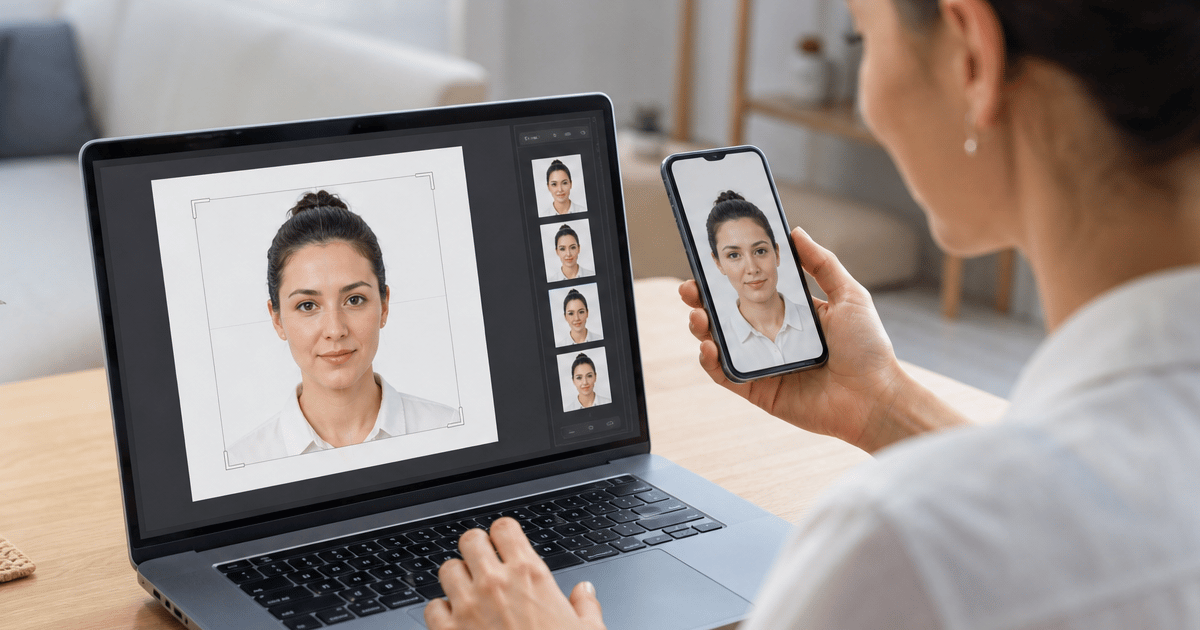
Get your compliant passport photo now
Upload any photo from your phone. We format the background, crop, and sizing to US specs — digital 2×2 file plus 4×6 print sheet in under 60 seconds.
Upload Your Photo →What it means to create a passport picture online
Creating a passport picture online means starting with any recent snapshot — usually a phone selfie, a picture a friend took, or a frame from your camera roll — and converting it to a compliant 2×2 inch image with a plain white background, correct head size, and export settings that U.S. government portals accept. You are not taking the picture inside a government system; you are formatting an existing image to published State Department specifications.
The create intent paired with the word picture signals a slightly different searcher than create passport photo. Picture often implies a casual source image already on your phone — not a formal studio session. Users who search create passport picture online want a clear sequence: pick a snapshot, upload, adjust, download, submit. They may never have formatted a passport image before and need confidence that the online output matches what acceptance facilities expect.
GetPassPhoto is a paid private service — not affiliated with the U.S. government. At getpassphoto.com/upload you upload once, preview the formatted result before payment, and receive a digital 600×600 pixel file plus a 4×6 print sheet by email within 60 seconds. Every order includes a 100% acceptance guarantee.
Passport picture vs. passport photo — same rules apply
Google treats passport picture and passport photo as overlapping search intents, but picture wording often attracts users who think of their camera roll first. Whether you call it a picture or a photo, U.S. acceptance facilities and online portals apply identical technical rules: 2×2 inch print size, plain white or off-white background, head height between 50–69% of the digital frame, color image, neutral expression, and capture within six months of your application date.
Calling it a picture does not lower the compliance bar. A bedroom snapshot with a patterned wall, a group picture cropped to one face, or a filtered selfie fails the same checks as a poorly formatted studio photo. Background replacement and crop-to-spec are the product — not face enhancement, smoothing, or AI alteration, which current State Department guidance flags as rejection risks.
If you already read our guide on how to create a passport photo online, the workflow is identical. This article focuses on picture-specific language and phone-gallery workflows. Upload any qualifying snapshot at getpassphoto.com/upload and our pipeline handles background, crop, and head-size validation before you pay.
U.S. specs your online passport picture must meet
Before you create a passport picture online, know the target. Printed pictures measure 2×2 inches (51×51 mm). Head height from chin to top of hair must occupy 50–69% of the image. Background must be plain white or off-white with no shadows, textures, or visible objects. Digital submissions use color JPEG at minimum 600×600 pixels, typically under 240 KB for DS-82 and DS-160.
Expression must be neutral with mouth closed and eyes open. Glasses are allowed only without glare; tinted lenses fail. The picture must be taken within six months of your application date — background replacement cannot fix an outdated image. Filters, beauty mode, and AI face alteration are rejection risks under current guidance.
Our 2026 passport photo requirements page lists the full measurement table. GetPassPhoto validates head size, background color, pixel dimensions, and file size automatically on every upload at getpassphoto.com/upload so you do not need to memorize every line of the spec sheet.
Step 1: Capture a usable source picture
Stand or sit in front of a plain light-colored wall. Face the camera directly with shoulders squared. Remove hats and non-prescription tinted glasses. Keep your expression neutral and mouth closed. Hold the phone at eye level — arm's length with the rear camera produces better resolution than a low-angle selfie.
Use indirect window light from the side rather than overhead-only bulbs or direct sun behind you. Overhead lighting creates under-eye shadows; backlighting silhouettes your face. Take ten to fifteen frames in burst mode and pick the sharpest picture with even lighting. Disable portrait mode, night mode, and beauty filters before capture — these alter edges and skin tone in ways that survive export.
For infants and newborns, lay the child on a white sheet and photograph from above — see our infant passport picture guide for flat-lay details. The same upload flow at getpassphoto.com/upload handles adult and infant source pictures without a separate app or account.
Step 2: Upload and create the formatted passport picture
Open getpassphoto.com/upload on your phone or computer. Select your best source picture from the gallery or take a new one in the browser. Our pipeline detects the face, replaces the background with compliant white, crops to 2×2 at 600×600 pixels, and measures head height against the 50–69% rule.
You preview the formatted passport picture on the verified screen before checkout. Inspect hairline edges, shoulder line, and overall head size at full zoom. If the head is too small or cropped awkwardly, retake the source picture rather than forcing a bad frame through — preview is free and unlimited until you are satisfied.
HEIC files from iPhone and high-resolution Android pictures are accepted and converted during processing. You do not need to resize or rename files before upload. The system reads the picture, formats it, and shows the compliant preview at getpassphoto.com/upload before any payment step.
Step 3: Choose digital, print, or both
After you approve the preview, choose the package that matches your submission path. The digital-only option at $14.99 delivers a JPEG sized for DS-82 online renewal, DS-160 visa applications, and most state ID portals. The Photo + Print bundle at $16.95 adds a 4×6 sheet with six identical 2×2 pictures for DS-11 in-person acceptance facilities.
Both files arrive by email within 60 seconds. No account is required. Save the digital attachment directly to a folder — do not screenshot the preview or re-save through a messaging app, which reduces quality and can push file size above portal limits.
One order at getpassphoto.com/upload covers every use case from a single source picture. Store the digital file for future visa or renewal needs within the six-month recency window. GetPassPhoto is a paid private service with a 100% acceptance guarantee — not a government website.
Step 4: Submit your created passport picture
For DS-82 online renewal, log into the State Department portal and upload the digital JPEG from your order confirmation email. Upload the original attachment without re-compression. The file is already under 240 KB at 600×600 pixels when you create a passport picture online through GetPassPhoto.
For DS-11 first-time or in-person renewal, print the 4×6 sheet before your acceptance facility appointment. Upload the same file to Walgreens, CVS, or Walmart as a standard 4×6 photo order for one-hour pickup, or print at home on photo paper at 100% scale with no fit-to-page option.
Attach one printed 2×2 picture to the application as directed by the acceptance agent. Bring a spare identical copy. The print sheet includes six copies from one order — all formatted from the same source upload at getpassphoto.com/upload.
Create passport picture online vs. pharmacy booth
Pharmacy counters charge $15–$20 and require an in-person visit during store hours. Creating a passport picture online lets you shoot at home, retry unlimited times before paying, and receive both digital and print outputs in one order.
Online formatting also avoids the fixed short session window at drugstores — useful for infants, toddlers, and anyone who needs multiple attempts to get a neutral expression. You select the best picture from a home session; the service formats it to spec at getpassphoto.com/upload.
Free online croppers can remove backgrounds but rarely verify head size or output exact portal dimensions. The rejection risk is higher with unverified free tools. GetPassPhoto closes that gap with automated validation, pricing from $14.99, and a money-back guarantee on rejections.
Which forms accept a passport picture you create online
DS-82 online passport renewal accepts a digital JPEG uploaded directly to the State Department website. DS-160 nonimmigrant visa applications use similar square JPEG specs. Many state REAL ID and driver license portals accept the same 600×600 minimum with white background.
DS-11 applications submitted in person require a printed 2×2 picture attached to the paper form. Global Entry, TSA PreCheck, and other trusted traveler programs often accept the same 2×2 spec — confirm each program's current instructions before submitting.
One GetPassPhoto order produces files for all of these paths. The digital JPEG and 4×6 print sheet share the same formatted crop from your source picture — no need to create separate versions manually. Start at getpassphoto.com/upload for any submission path.
Common mistakes when you create a passport picture online
Using a picture older than six months is the most overlooked rejection reason. Create a fresh source snapshot before uploading even if an older image looks similar. Recency is verified by human review, not by metadata alone.
Submitting a free tool export without verifying file size causes instant DS-82 upload failures. Phone originals often exceed 3 MB. GetPassPhoto compresses to under 240 KB while maintaining the 600×600 pixel minimum when you create a passport picture online through our paid service.
Printing the 4×6 sheet at the wrong scale produces 2×2 pictures that measure incorrectly on paper. Set the printer to 100% with no fit-to-page. If home printing mis-scales repeatedly, use pharmacy online upload for the same print sheet file from your getpassphoto.com/upload order.
Skipping the preview step before payment means you might download a crop with hair cut off or shoulders too tight. Always inspect the verified preview at full zoom — retake and re-upload at no cost until the preview looks correct.
Why GetPassPhoto when you create a passport picture online
Head size verification separates compliant output from square crops that look correct on a phone. Our system locates chin, crown, and shoulders, calculates head height as a percentage of frame, and adjusts crop before background processing. You see the corrected preview before paying at getpassphoto.com/upload.
Background replacement runs after crop confirmation. We replace wall color, clutter, and outdoor scenery with uniform white meeting State Department off-white specifications without altering facial features or expression. Background and crop-to-spec are standard industry steps; AI face alteration is not part of our pipeline.
The 100% acceptance guarantee means a rejection is our problem, not yours. Forward the rejection notice from the State Department, acceptance facility, or visa portal for a full refund. We are a paid private service starting at $14.99 for digital or $16.95 with print — not affiliated with the U.S. government.
After you create your passport picture: storage and reuse
Save the digital JPEG and print sheet in a dated folder labeled with the day you took the source picture. When the six-month recency window approaches for a future application, you will know exactly when to create a new passport picture online.
Family members can use the same workflow independently — upload and checkout once per person at getpassphoto.com/upload. Each order includes digital files plus print sheets with the same 100% acceptance guarantee.
Compare the formatted preview to the State Department spec sheet before submitting anywhere. Head height, background whiteness, and square crop are visible at full zoom. If any element looks off, retake your source picture and re-upload — you pay only when you download the final compliant files.
Frequently asked questions
Can I create a passport picture online with my iPhone?
Yes. Take a source picture with your iPhone, open getpassphoto.com/upload in Safari, and complete the flow without installing an app. HEIC files are accepted and converted during processing.
Is a passport picture the same as a passport photo for U.S. applications?
Yes. Picture and photo refer to the same compliance standard — 2×2 inches, white background, 50–69% head height, and recent capture. GetPassPhoto formats either term's source image to identical specs.
How long does it take to create a passport picture online?
Upload and preview take about a minute. After payment, digital and print files arrive by email within 60 seconds.
Does a passport picture created online work for DS-82 renewal?
Yes. GetPassPhoto outputs a 600×600 pixel JPEG under 240 KB sized specifically for the DS-82 online portal.
What does it cost to create a passport picture online?
GetPassPhoto charges $14.99 for a digital 2×2 file or $16.95 for digital plus a 4×6 print sheet — comparable to or less than most pharmacy options, with a 100% acceptance guarantee.
GetPassPhoto services
Related guides
- How to Make a Passport Picture Online (Compliant 2×2 in 60 Seconds)
Make a passport picture online from any phone snapshot. Auto-format to 2×2, white background, and correct head size for DS-11, DS-82, and DS-160.
- How to Create a Passport Photo Online (Compliant 2×2 in 60 Seconds)
Create a passport photo online from any phone picture. Step-by-step guide to background, crop, head size, and download for DS-11, DS-82, and DS-160.
- Free Passport Picture Maker: Limits, Risks, and When to Pay for Compliance
Compare free passport picture makers to verified formatting. What free tools do well, where they fail U.S. specs, and how to get a compliant 2×2 picture without rejection.
Get your compliant passport photo now
Upload any photo from your phone. We format the background, crop, and sizing to US specs — digital 2×2 file plus 4×6 print sheet in under 60 seconds.
Upload Your Photo →