
Requirements
Make a Photo 2×2: Passport Size Crop, Pixels, and Print Guide
Make any photo 2×2 inches for U.S. passport use. Correct aspect ratio, 600×600 pixels, head size rules, and print instructions.
Updated May 28, 2026
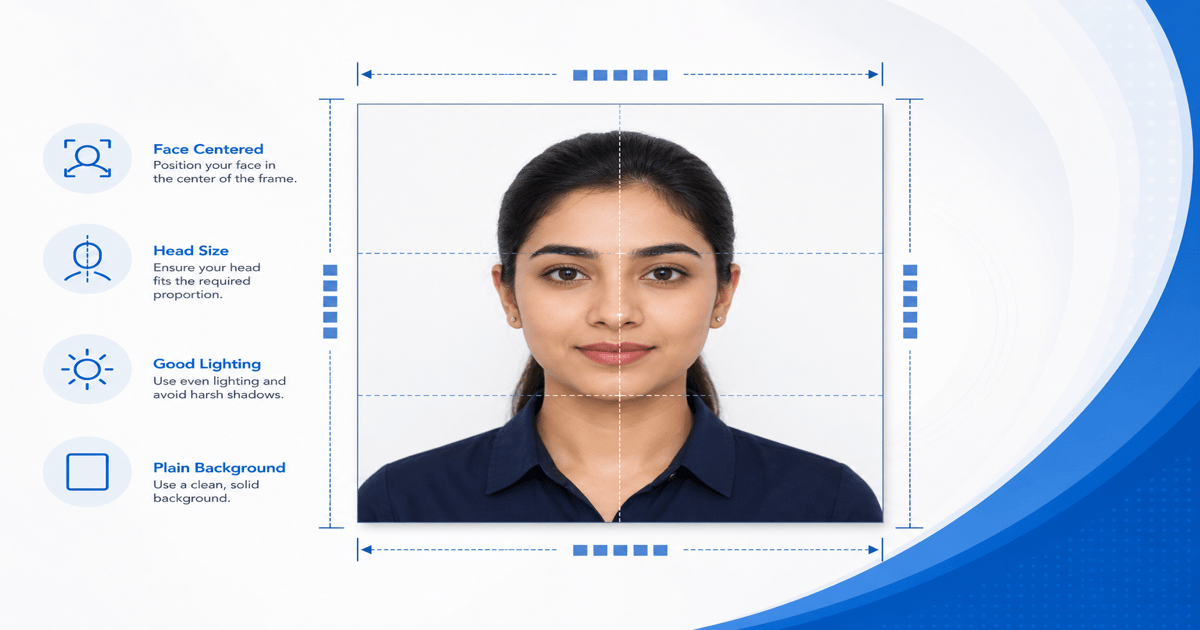
Get your compliant passport photo now
Upload any photo from your phone. We format the background, crop, and sizing to US specs — digital 2×2 file plus 4×6 print sheet in under 60 seconds.
Upload Your Photo →What 2×2 means for passport photos
A 2×2 passport photo is a square — equal width and height — measuring 2 inches (51 mm) on each side when printed. Digitally, it is 600×600 pixels minimum at 300 DPI.
The 2×2 dimension refers to the paper or canvas size, not the head size. Within that square, the head must occupy 50–69% of the height — roughly 1 to 1⅜ inches from chin to top of hair.
GetPassPhoto outputs a 600×600 pixel digital file and a 4×6 print sheet with six 2×2 photos. Upload once, get both formats.
Making a 2×2 crop in a photo editor
Open your photo in any editor that supports fixed aspect ratio cropping. Set the crop tool to 1:1 (square). Position the face so the head fills about 60% of the crop area height.
Do not use a 2×2 inch crop at screen resolution — screen DPI varies. Instead, crop to square at full resolution, then resize the final export to 600×600 pixels.
Fill or replace the background with white before exporting. A 2×2 crop with a gray or colored background will be rejected regardless of correct dimensions.
Common 2×2 mistakes
Wrong aspect ratio: cropping to 2×3 or 4×6 and then squeezing to square distorts facial features. Always start with a 1:1 crop.
Head too small: leaving too much space above the head and below the shoulders makes the face appear distant. Examiners reject photos where the head occupies less than 50% of frame height.
Head too large: cropping tight on the forehead or chin cuts off required facial features. The full oval of the face must be visible.
From 2×2 digital to 2×2 print
A 600×600 pixel file at 300 DPI prints as exactly 2×2 inches. Print on 4×6 photo paper using a pre-arranged print sheet to avoid scaling errors.
GetPassPhoto's 4×6 print sheet places six 2×2 photos at correct spacing. Print at 100% scale — no "fit to page." Cut with scissors or a trimmer.
For pharmacy printing instructions, see our guide on printing passport photos online.
Automating the 2×2 conversion
Manual 2×2 cropping takes 10–20 minutes per attempt and often still fails head size checks. GetPassPhoto automates crop, background, head measurement, and export in under 60 seconds.
Every order includes a 100% acceptance guarantee. If your 2×2 photo is rejected for sizing, we refund in full.
For full passport size specs including DPI and file format, see our guide on making a photo passport size.
Understanding DPI and resolution for 2×2 passport photos
The relationship between pixels, DPI, and printed inches confuses most people who try to make a photo 2×2 at home. DPI — dots per inch — tells a printer how many pixels to pack into each inch of paper. A file that is 600 pixels wide at 300 DPI prints as exactly 2 inches wide because 600 divided by 300 equals 2. If you export the same 600×600 pixel file but the printer driver treats it as 72 DPI, the print comes out roughly 8.3 inches square — far too large for a passport application. Phone screens make this worse because they display images at screen DPI, not print DPI, so a square crop that looks correct on your phone may print at the wrong physical size.
Minimum pixel count and DPI work together. The State Department requires at least 600×600 pixels for digital submission and 2×2 inches for printed photos. Meeting the pixel minimum alone does not guarantee a correct print. You also need the file tagged or prepared at 300 DPI so printers interpret the dimensions correctly. Many free editors export square images at 72 or 96 DPI by default. The image looks fine on screen but fails when an acceptance agent measures the print with a ruler. GetPassPhoto exports at 300 DPI with correct metadata so pharmacy printers and home photo printers produce 2×2 inch output without manual scaling.
Source photo resolution matters before you ever crop to 2×2. A phone photo taken at arm's length typically provides 3000×4000 pixels or more — plenty of data for a clean 600×600 export. A screenshot, a heavily compressed messaging app image, or a photo zoomed from across the room may not survive the crop. When you reduce a large image to 600×600, detail is preserved. When you enlarge a small image to 600×600, the face looks soft or pixelated and examiners reject it. Start with the highest-resolution source available, then let automated formatting handle the resize. See our passport photo size in pixels reference for the full conversion table.
2×2 U.S. size vs international passport dimensions
Searching "make photo 2×2" often surfaces mixed results because 2×2 inches is the U.S. standard — not the global one. Many countries use 35×45 mm (approximately 1.38×1.77 inches), a rectangular format that is taller and narrower than the American square. European Schengen visas, UK passport photos, and Indian passport photos all use different aspect ratios. If you crop to 2×2 for a U.S. passport and then reuse that file for a visa application in another country, it will fail that country's portal checks even if it passed U.S. review.
Within the United States, 2×2 applies broadly: passport books, passport cards, most visa photos submitted to U.S. embassies for U.S. visas, and many state DMV photos. The head-size rule — 50–69% of frame height — also applies across these use cases. DS-11 first-time passport applications, DS-82 online renewals, and DS-160 nonimmigrant visa forms all reference the same 2×2 inch specification. Some agencies add their own file-size or background rules on top, but the core square dimensions stay consistent. One correctly formatted 2×2 file from GetPassPhoto covers multiple U.S. government submissions.
Do not trust generic "passport photo maker" tools that default to 35×45 mm or offer a dropdown of country templates without verifying U.S. output. A tool that produces a correct Indian passport photo will produce a rejected U.S. passport photo. Before you submit anywhere, confirm the output is square — equal width and height — and measures 2×2 inches printed or 600×600 pixels digitally. If you also need photos for another country, format each one separately. Our guide on making a photo passport size explains how U.S. specs differ from international templates and when a single upload can serve multiple U.S. forms.
Pre-submission checklist for your 2×2 photo
Before you attach a 2×2 photo to DS-11 or upload it to a renewal portal, run through a short checklist. First, confirm the aspect ratio is exactly 1:1 — measure width and height in pixels or inches; they must match. Second, measure head height as a percentage of total frame height. The chin-to-crown distance must fall between 50% and 69%. Third, verify the background is plain white or off-white with no shadows, gradients, or visible objects at the edges of the frame. Fourth, check file format: JPEG only, minimum 600×600 pixels, typically under 240 KB for online portals. Missing any one item causes rejection even when everything else looks perfect.
Printed 2×2 photos need two additional checks. Measure the cut print with a ruler — each side must be 2 inches (51 mm), not "close enough." Examine the paper: glossy or matte photo stock is required; office paper is an automatic rejection at most acceptance facilities. Hold the print next to your digital preview and compare skin tone and background color. If the print looks gray where the screen showed white, the printer scaled or color-shifted the file. Reprint at 100% scale on photo paper before your appointment. GetPassPhoto's 4×6 print sheet is pre-sized to eliminate scaling errors — upload it to Walgreens or CVS as a standard 4×6 print, not as an in-store passport photo session.
Expression and recency rules apply to 2×2 photos the same as any passport photo. Face the camera directly with a neutral expression and mouth closed. Glasses are allowed only if you wear them daily; glare on lenses is a rejection reason. The photo must be taken within six months of your application date. Filters, beauty mode, and portrait-mode background blur all alter the image in ways the State Department flags under 2026 guidance. GetPassPhoto auto-formats background and crop only — no skin smoothing or facial alteration. Upload at getpassphoto.com/upload, preview the result, and download a verified 2×2 file with our 100% acceptance guarantee. If the photo is rejected, forward the notice for a full refund.
Keep a copy of both the digital JPEG and the print sheet after you order. Many applicants submit DS-82 online and later need a printed 2×2 for a visa interview, Global Entry, or a state ID renewal at the DMV. Because every copy on the GetPassPhoto print sheet is identical, you can cut extras and store them with your passport records. Label the envelope with the date the source photo was taken so you know when the six-month recency window expires. If you need a refreshed photo later, upload a new selfie rather than re-cropping the old file — examiners compare against your current appearance at the interview or acceptance appointment.
Frequently asked questions
Is 2×2 the same as passport photo size?
Yes. U.S. passport photos are 2×2 inches (51×51 mm). This is different from the 35×45 mm size used in many other countries.
How many pixels is a 2×2 passport photo?
Minimum 600×600 pixels at 300 DPI. GetPassPhoto outputs exactly this resolution.
Can I make a 2×2 photo on my iPhone?
The iPhone Photos app can crop to square, but it does not verify head size, replace backgrounds, or export at 600×600 pixels. Upload to GetPassPhoto for compliant output.
How do I print a 2×2 photo without cutting wrong?
Use a 4×6 print sheet with pre-positioned 2×2 photos and cut along guide lines. GetPassPhoto includes this sheet in every order.
GetPassPhoto services
Related guides
- How to Make a Photo Passport Size: 2×2 Inches and 600×600 Pixels
Make any photo passport size — 2×2 inches, 600×600 pixels, correct head height. Specs for print and digital submission.
- Make Background White for Passport Photo: Rules and Methods
Make the background white for a passport photo. State Department color specs, DIY methods, and why background replacement is the hardest step.
- How to Make a Passport Photo Online (Compliant in 60 Seconds)
Make a passport photo online from any selfie. Auto-format to 2×2, white background, and correct head size for DS-11, DS-82, and DS-160.
Get your compliant passport photo now
Upload any photo from your phone. We format the background, crop, and sizing to US specs — digital 2×2 file plus 4×6 print sheet in under 60 seconds.
Upload Your Photo →