
Requirements
How to Make a Photo Passport Size: 2×2 Inches and 600×600 Pixels
Make any photo passport size — 2×2 inches, 600×600 pixels, correct head height. Specs for print and digital submission.
Updated May 28, 2026
Get your compliant passport photo now
Upload any photo from your phone. We format the background, crop, and sizing to US specs — digital 2×2 file plus 4×6 print sheet in under 60 seconds.
Upload Your Photo →Passport photo size: the two numbers you must know
U.S. passport photos are 2×2 inches (51×51 mm) when printed. Digitally, the file must be at least 600×600 pixels at 300 DPI, saved as JPEG, typically under 240 KB for online upload portals.
These are not interchangeable specs. A 600×600 pixel image printed at the wrong DPI will not measure 2×2 inches on paper. Conversely, a correctly sized print scanned back to digital may not meet pixel minimums.
GetPassPhoto outputs both formats from one upload: a 600×600 pixel digital JPEG and a 4×6 print sheet with six 2×2 photos at 300 DPI.
Head size within the 2×2 frame
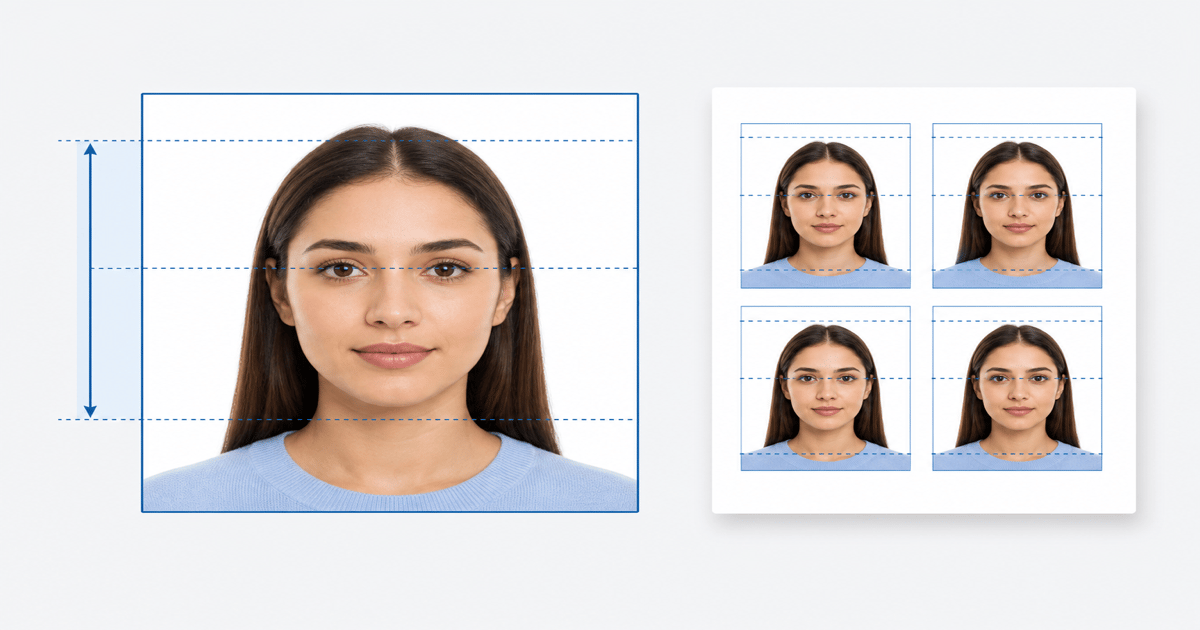
The head — measured from chin to top of hair — must occupy between 50% and 69% of the total image height. For a 2×2 inch photo, that means the head measures 1 to 1⅜ inches tall.
Most DIY crops fail this measurement. People crop too tight (head too large) or too wide (head too small). Automated head detection avoids the guesswork.
Hair volume counts toward the top of the head. Do not flatten or compress hair to cheat the measurement, but do not leave excessive space above the head either.
Converting a regular photo to passport size in an editor
If you attempt this manually, set your canvas to 600×600 pixels. Place the face so the chin-to-crown distance fills roughly 60% of the frame height. Fill the background with pure white (#FFFFFF) or off-white (#F5F5F5).
Export as JPEG at quality 80–90%. Check the file size — most portals reject files over 240 KB. If the file is too large, reduce quality slightly without dropping below 600×600 pixels.
Manual editing works but is slow and error-prone. See our guide on making a photo 2×2 for a step-by-step breakdown, or upload to GetPassPhoto for automatic formatting instead.
Print size vs. digital size: when each applies
DS-11 first-time applications submitted in person require a physical 2×2 inch photo attached to the form. DS-82 online renewals and DS-160 visa applications require the digital 600×600 pixel file.
Some acceptance facilities now accept digital photos on USB drives, but the printed 2×2 remains the standard. Always bring a printed copy to in-person appointments unless told otherwise.
For pixel-level detail including DPI and aspect ratio, see our passport photo size in pixels reference page.
Why sizing errors cause rejections
Passport examiners check photos against a physical template at acceptance facilities. Digital submissions use automated checks for dimensions, file type, and head proportion. A photo that looks correct on your phone screen may fail both checks.
Common rejection reasons tied to size: head too small (more than 69% of frame is empty space above and below), head too large (face cropped at forehead or chin), and non-square aspect ratio.
GetPassPhoto validates head size and dimensions before you download. Our 100% acceptance guarantee covers sizing errors — if the photo is rejected for size, we refund in full.
Phone camera resolution vs. passport pixel minimums
Modern smartphones capture photos at 3000×4000 pixels or higher — far above the 600×600 minimum the State Department requires for digital submission. Camera resolution is rarely the problem when you make a photo passport size from a phone shot. The problem is what happens after capture: cropping, background replacement, and export settings that strip compliance without you noticing until an upload portal rejects the file. Even a 48-megapixel sensor produces a rejected submission if the exported JPEG is the wrong aspect ratio or the head occupies only 40% of frame height.
iPhone and Android default camera apps save JPEGs at varying quality levels. HEIC format on iPhone must be converted to JPEG before any passport portal will accept it. When you crop in the native Photos app, the export often preserves arbitrary dimensions like 1080×1080 or 3024×3024 rather than the exact 600×600 pixels travel.state.gov expects. Downscaling a 3000-pixel square to 600×600 is straightforward; upscaling a 400×400 thumbnail is not — and many free editors silently upscale low-res crops without warning.
GetPassPhoto accepts the full-resolution original upload and outputs exactly 600×600 pixels at 300 DPI regardless of source device. You do not need a special camera or a tripod setup — you need correct formatting on the way out. Upload any recent phone photo and we handle pixel dimensions, head proportion, background color, and JPEG compression in one pass. The preview shows the compliant crop before you pay, so you can retake the source photo if expression or lighting needs adjustment.
Measuring head height with a paper template
If you are sizing a passport photo manually, a paper template is the most reliable verification tool short of professional software. Print a blank 2×2 inch square at actual size — use a ruler to confirm each side measures exactly 2 inches before trusting the template. Mark a horizontal line 1 inch from the bottom edge and another 1⅜ inches from the bottom. The chin should sit near the lower line and the top of the hair near the upper line, with the head filling the band between them. Tape the template over your monitor while adjusting crop position in an editor for a rough on-screen check before printing.
Hold the printed template over your cropped photo on a light table or against a bright window. Misalignment becomes obvious: too much space above the hair means the head is undersized; a cropped forehead means the head is oversized. Acceptance facility clerks use similar physical guides when they inspect DS-11 applications, which is why a photo that looks fine on a phone screen fails in person. Print the template at 100% scale — browser "fit to page" settings produce useless guides.
Templates cannot fix background color, expression, or shadow issues — they only verify proportion. For a faster path, upload to GetPassPhoto and we measure chin-to-crown height as a percentage of frame automatically. If the crop is off, we adjust before you pay. Our 100% acceptance guarantee covers head-size rejections, so you are not guessing with a ruler and a hope.
Square crop mistakes on iPhone, Android, and desktop editors
The most common DIY error when making a photo passport size is applying a square crop without adjusting vertical position. Center-cropping a portrait-oriented selfie puts the face too low in the frame, leaving excessive empty space above the head and triggering automated head-size failures. The fix is to shift the crop upward so the chin sits in the lower third and the crown sits near the upper third — but most phone editors do not show percentage guides, so users guess wrong repeatedly and submit anyway.
Desktop editors like Photoshop, GIMP, and Canva introduce a different failure mode: aspect ratio lock. Users start with a rectangular canvas, crop the face, then resize the canvas to 600×600. If "constrain proportions" is enabled during that resize step, the face gets squashed or stretched. The correct workflow is crop first at the target aspect ratio, then scale — never stretch a rectangle into a square after the fact.
GetPassPhoto sidesteps editor-specific pitfalls entirely. We detect facial landmarks, calculate the compliant crop window, replace the background with spec white, and export a square JPEG at the exact pixel dimensions U.S. portals require. You keep the source photo from whatever device or editor you prefer; we produce the submission-ready file. See our guide on making a 2×2 photo for editor-specific tips, or upload now and skip the trial-and-error cycle.
DPI, JPEG quality, and the 240 KB upload ceiling
Digital passport submissions through travel.state.gov and the DS-160 visa portal enforce a maximum file size — typically 240 KB for JPEG uploads — alongside the 600×600 pixel minimum. Those two constraints pull in opposite directions: higher resolution and higher quality increase file size, while aggressive compression introduces blocky artifacts around hair edges that automated scanners flag as background violations. DIY exporters often hit one limit by breaking the other. A file at 245 KB gets rejected even when every visual spec is correct — so the final export step matters as much as the crop.
DPI metadata is frequently misunderstood. A 600×600 pixel image tagged at 300 DPI tells print software to output a 2×2 inch physical print. A 600×600 image tagged at 72 DPI is still 600×600 pixels for online upload purposes — portals check pixel dimensions, not DPI labels. Problems arise when users upscale low-resolution crops to 600×600 and embed a fake 300 DPI tag, producing a soft, pixelated face that human examiners reject even when automated size checks pass. Always export from the original high-resolution source.
GetPassPhoto exports a JPEG optimized for both constraints: exactly 600×600 pixels, 300 DPI metadata for print workflows, and compressed to under 240 KB without visible artifacting around hair or background edges. You receive the same file whether you need DS-82 online renewal or a source image for pharmacy printing. If a portal rejects the file for technical reasons covered by our spec checklist, forward the rejection notice for a full refund under the 100% acceptance guarantee. File size and pixel dimensions are validated before delivery — not guessed after the fact.
Frequently asked questions
What is the exact pixel size for a U.S. passport photo?
Minimum 600×600 pixels. GetPassPhoto outputs exactly 600×600 pixels at 300 DPI, which satisfies all current State Department digital submission requirements.
Can a passport photo be 2×2 cm instead of 2×2 inches?
No. U.S. passport photos must be 2×2 inches (51×51 mm). The 35×45 mm size used in many other countries does not meet U.S. requirements.
How do I check if my head is the right size?
Measure the head height in the image as a percentage of total image height. It must be 50–69%. GetPassPhoto calculates this automatically and adjusts the crop if needed.
Does passport photo size differ for children?
The 2×2 inch and 600×600 pixel requirements are the same for all ages. Head size proportion rules also apply to children and infants, with minor expression flexibility for infants under six months.
GetPassPhoto services
Related guides
- Make a Photo 2×2: Passport Size Crop, Pixels, and Print Guide
Make any photo 2×2 inches for U.S. passport use. Correct aspect ratio, 600×600 pixels, head size rules, and print instructions.
- Make Background White for Passport Photo: Rules and Methods
Make the background white for a passport photo. State Department color specs, DIY methods, and why background replacement is the hardest step.
- How to Make a Passport Photo Online (Compliant in 60 Seconds)
Make a passport photo online from any selfie. Auto-format to 2×2, white background, and correct head size for DS-11, DS-82, and DS-160.
Get your compliant passport photo now
Upload any photo from your phone. We format the background, crop, and sizing to US specs — digital 2×2 file plus 4×6 print sheet in under 60 seconds.
Upload Your Photo →