
Printing
Print Passport Photo Online: Digital File to 2×2 Prints
Print passport photos online from a digital file. 4×6 print sheets for Walgreens, CVS, Walmart, or home printing at correct 2×2 size.
Updated May 28, 2026
Get your compliant passport photo now
Upload any photo from your phone. We format the background, crop, and sizing to US specs — digital 2×2 file plus 4×6 print sheet in under 60 seconds.
Upload Your Photo →Why you need a print-ready file, not just a digital upload
Online passport renewal (DS-82) accepts a digital JPEG. First-time applications (DS-11) and many in-person renewals still require a physical 2×2 inch photo attached to the application form.
Printing a passport photo is not as simple as hitting "print" on a cropped selfie. The print must be exactly 2×2 inches on glossy or matte photo paper, with no borders, and color-accurate. Most home printers distort size unless the file is prepared for a specific paper format.
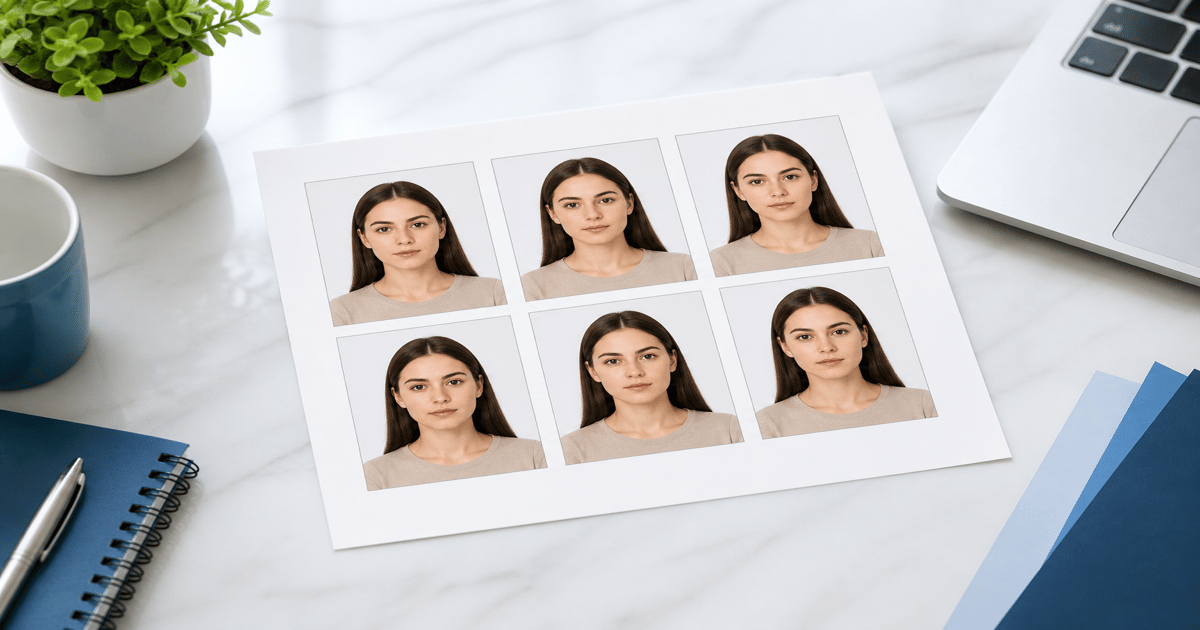
GetPassPhoto includes a 4×6 print sheet in every order — six 2×2 photos arranged for standard photo lab printing. Upload once, get both digital and print-ready files.
Printing at Walgreens, CVS, or Walmart online
All three chains accept 4×6 photo uploads through their websites or apps. Upload the GetPassPhoto 4×6 print sheet, select 4×6 glossy photo paper, and choose in-store pickup or delivery.
Do not select "passport photo" as the product type at the pharmacy kiosk — those services take a new photo on-site. Instead, upload your pre-formatted 4×6 sheet as a standard photo print.
Pick up prints and cut along the faint guide lines to separate six identical 2×2 photos. One goes on the application; keep spares for visa applications or state ID renewals.
Online print services vs. in-store passport photo counters
In-store passport photo counters charge $15–$20 and take the photo on the spot. You cannot review or retry before printing. Online formatting plus pharmacy printing gives you control over the source photo and costs less overall.
GetPassPhoto's print sheet is pre-sized at 300 DPI. Each 2×2 photo on the sheet measures exactly 600×600 pixels, so pharmacy printers produce correctly sized output without additional cropping.
For detailed pharmacy instructions, see our guide on passport photo printing.
Ordering prints online and shipping to your door
If you do not live near a pharmacy, upload the 4×6 sheet to Walgreens.com, CVS.com, or a mail-order photo service. Select standard 4×6 glossy prints. Delivery typically takes 1–3 days for pickup orders, longer for shipped prints.
Verify the print when it arrives. Check that colors look natural, the background is white (not gray or blue), and the head is centered. If a pharmacy printer produces a bad print, reprint from the same file at a different location — the file is not the problem.
Keep the digital file for DS-82 online renewal even if you also need prints for DS-11. One GetPassPhoto order covers both use cases.
What GetPassPhoto delivers for online printing
Every order includes an email with two attachments: a 600×600 pixel digital JPEG and a 4×6 inch print sheet JPEG. Both are formatted to State Department specifications.
The print sheet option costs $16.95 — $2 more than the digital-only tier. That includes six print-ready 2×2 photos, which would cost $15–$20 at a pharmacy counter for a single session.
If your printed photo is rejected at an acceptance facility, forward the rejection notice for a full refund under our 100% acceptance guarantee.
Step-by-step: upload a GetPassPhoto sheet to Walgreens.com
Start with the 4×6 print sheet JPEG from your GetPassPhoto order email — not the 600×600 digital file. The print sheet is designed for photo-lab paper; the digital file is designed for online portal upload. Open Walgreens Photo in a browser or the Walgreens app, sign in or continue as guest, and select "Print Photos" or "4×6 Prints" from the main menu. Do not navigate to the passport photo service — that path takes a new in-store capture and ignores your pre-formatted file. The standard photo print workflow preserves the six-up layout; the passport kiosk workflow does not.
Upload the 4×6 JPEG from your device. When the preview appears, confirm the image shows six identical 2×2 photos arranged on one sheet with a white background. Select glossy or matte photo paper — both are accepted at passport acceptance facilities. Choose quantity one unless you want backup sheets. Add to cart, select your nearest store for pickup, and complete checkout. Most locations offer same-day pickup within one to two hours during business hours on weekdays.
At pickup, inspect the print before leaving the store. Hold a ruler against one of the six photos — each side should measure 2 inches. If the print looks dark, washed out, or scaled wrong, ask for a reprint at the photo counter before you cut the sheet. The GetPassPhoto file is correct; pharmacy printer settings occasionally need a second attempt. Cut along the guide lines with scissors or a paper trimmer, attach one 2×2 to your DS-11 form, and store the remaining copies flat in an envelope for visa or Real ID applications later. Keeping spares flat prevents creases that examiners flag on resubmission.
Turnaround time when your passport appointment is soon
Passport processing timelines do not wait for slow print shipping. If your acceptance facility appointment is tomorrow, prioritize in-store pickup over mail delivery. Walgreens, CVS, and Walmart photo centers typically turn around online orders in one to four hours when you select store pickup before the location's daily cutoff. Upload your GetPassPhoto 4×6 sheet in the morning and collect prints on the way to your appointment. Same-day pickup is the standard path for travelers who formatted their photo the night before a scheduled DS-11 submission.
Mail-order services — Amazon Photos, Snapfish, Shutterfly — add two to seven shipping days depending on your address and shipping tier. They produce acceptable quality when you need prints for a renewal deadline that is weeks away, not days. Factor in transit time plus a buffer day in case the first shipment arrives with color issues and you need a reprint.
GetPassPhoto delivers the digital file and print sheet by email within 60 seconds of purchase. The bottleneck is never formatting — it is print production. Order the $16.95 bundle with print sheet even if you plan to upload to a pharmacy online; the $14.95 digital-only tier does not include the 4×6 layout pharmacies expect. If you miss a deadline because of print logistics, you still have the 600×600 file ready for DS-82 online renewal while you reschedule an in-person DS-11 submission.
Alternatives to pharmacy chains: Costco, Amazon Photos, and Snapfish
Costco Photo centers accept 4×6 uploads through Costco.com for members. Quality is consistently high — commercial dye-sublimation printers with calibrated color — and per-print pricing is often lower than pharmacy chains. Upload the GetPassPhoto 4×6 sheet as a standard print, not a passport product. Pick up at the warehouse photo desk and verify size with a ruler before cutting.
Amazon Photos and Snapfish work well when no pharmacy is nearby and you can wait for shipping. Upload the same 4×6 JPEG, select glossy 4×6 prints, and choose standard shipping unless you pay for expedited delivery. Both services occasionally auto-crop uploaded images — disable any "enhance" or "auto crop" options in the upload flow so the full six-photo sheet prints at actual size.
Independent local print shops and UPS Store locations also accept uploaded JPEGs on USB drives or via email. Bring the GetPassPhoto 4×6 file on your phone or a flash drive and ask for a 4×6 glossy print at 100% scale with no cropping. The acceptance facility does not care which chain printed your photo — only that the final 2×2 cutout meets State Department specs. GetPassPhoto formats the source file; any photo lab that prints at true size produces an acceptable result.
Common pharmacy print errors and how to fix them without reformatting
The most frequent pharmacy print problem is incorrect scaling — the entire 4×6 sheet prints slightly smaller or larger than actual size, which means each 2×2 cutout fails the ruler test at the acceptance facility. This is a printer driver issue, not a file issue. Reprint the same GetPassPhoto JPEG with scaling locked to 100% and confirm the clerk did not enable "fit to page" in the kiosk software. If one location consistently scales wrong, try a different store using the identical file. Measure before you cut — a 1/16-inch error on the sheet translates to visibly wrong head sizing on the trimmed 2×2.
Color casts are the second common failure: skin tones print too red, too yellow, or too green while the on-screen preview looked neutral. Pharmacy kiosks use their own color profiles, which vary by machine age and maintenance schedule. Ask for a reprint on a different paper type setting — switching between glossy and matte sometimes corrects a bad profile match. Compare the reprint against the digital preview on your phone at maximum brightness before accepting the order at the counter.
Blurry or soft prints usually indicate a kiosk downscaled your upload or applied an automatic "enhance" filter. Disable all enhancement options in the upload flow and upload the original GetPassPhoto attachment directly from email rather than a forwarded or screenshot copy. Screenshots reduce effective resolution and produce soft faces that examiners reject. The underlying formatted file rarely needs to change — only the print production settings do. If a photo is rejected for content reasons after a correctly scaled print, GetPassPhoto refunds under the 100% acceptance guarantee.
Frequently asked questions
Can I print passport photos online at Walgreens?
Yes. Upload the GetPassPhoto 4×6 print sheet to Walgreens Photo as a standard 4×6 print. Do not use the in-store passport photo service — upload your pre-formatted file instead.
How many passport photos are on the print sheet?
Six identical 2×2 inch photos arranged on one 4×6 inch sheet. Cut them apart with scissors or a paper trimmer.
What paper should I use for passport photo prints?
Standard glossy or matte photo paper. Do not print on regular office paper — acceptance facilities expect photo-quality paper with accurate color reproduction.
Can I print passport photos online without visiting a store?
Yes. Upload the 4×6 sheet to any online photo printing service that ships to your address, or print at home on a photo-capable printer. See our guide on printing passport photos at home for home printer settings.
GetPassPhoto services
Related guides
- Print Passport Photo at Home: Settings, Paper, and Size Check
Print a 2×2 passport photo at home on photo paper. Printer settings, size verification, and when home printing beats the pharmacy.
- How to Make a Passport Photo Online (Compliant in 60 Seconds)
Make a passport photo online from any selfie. Auto-format to 2×2, white background, and correct head size for DS-11, DS-82, and DS-160.
- Make a Photo 2×2: Passport Size Crop, Pixels, and Print Guide
Make any photo 2×2 inches for U.S. passport use. Correct aspect ratio, 600×600 pixels, head size rules, and print instructions.
Get your compliant passport photo now
Upload any photo from your phone. We format the background, crop, and sizing to US specs — digital 2×2 file plus 4×6 print sheet in under 60 seconds.
Upload Your Photo →